





Summary AI vs Avoma is mainly a choice between a simple AI meeting tool and a tool built more for sales teams.
Summary AI focuses on notes, transcripts, and translation. You can use it for meetings, interviews, lectures, calls, and in-person conversations. It also supports more than 120 languages and live translation.
Avoma also creates meeting notes, but it adds more sales and customer tools. It can update CRM records, schedule meetings, help with sales coaching, and connect conversations with pipeline and revenue management.
In simple terms, Summary AI focuses more on recording and understanding conversations. Avoma focuses more on sales, CRM, and customer workflows.
Key Facts
- Summary AI focuses on AI notes, transcription, and translation in more than 120 languages.
- Avoma focuses more on CRM, coaching, scheduling, and revenue workflows.
- Both support live transcription, summaries, action items, and AI search.
- Summary AI costs $8.99 per week and $79.99 per year, while Avoma starts at $19 per recorder per month when billed annually.
- Many advanced Avoma features, including coaching and revenue intelligence, are sold as separate add-ons.
Summary AI vs Avoma at a glance
| Feature | Summary AI | Avoma |
|---|---|---|
| Best for | AI notes, transcription, translation, flexible recording | Customer meetings, CRM workflows, coaching, revenue teams |
| Price | $8.99/week or $79.99/year | From $19/recorder/month billed annually |
| Free trial | Limited, plus free tools | 14 days |
| Free viewers | No | Yes |
| Zoom, Google Meet, Microsoft Teams | Yes | Yes |
| Webex | Limited | Yes |
| Live transcription | Yes | Yes |
| AI summaries and action items | Yes | Yes |
| AI chat | Yes | Yes |
| Languages | 120+ | 70+ |
| Live translation | Yes | Yes |
| In-person recording | Yes | Yes |
| Recording length | Any duration | Depends on workflow |
| Audio and video uploads | Yes | Yes, with limits |
| PDF and OCR tools | Yes | No |
| CRM synchronization | No | Yes |
| Salesforce and HubSpot | No | Yes |
| Scheduling | No | Yes |
| Sales coaching | No | Yes as add-on |
As you can see, the biggest difference is scope. Summary AI stays closer to the conversation itself, while Avoma connects meetings with CRM records, sales coaching, scheduling, and revenue workflows.
What is Summary AI?
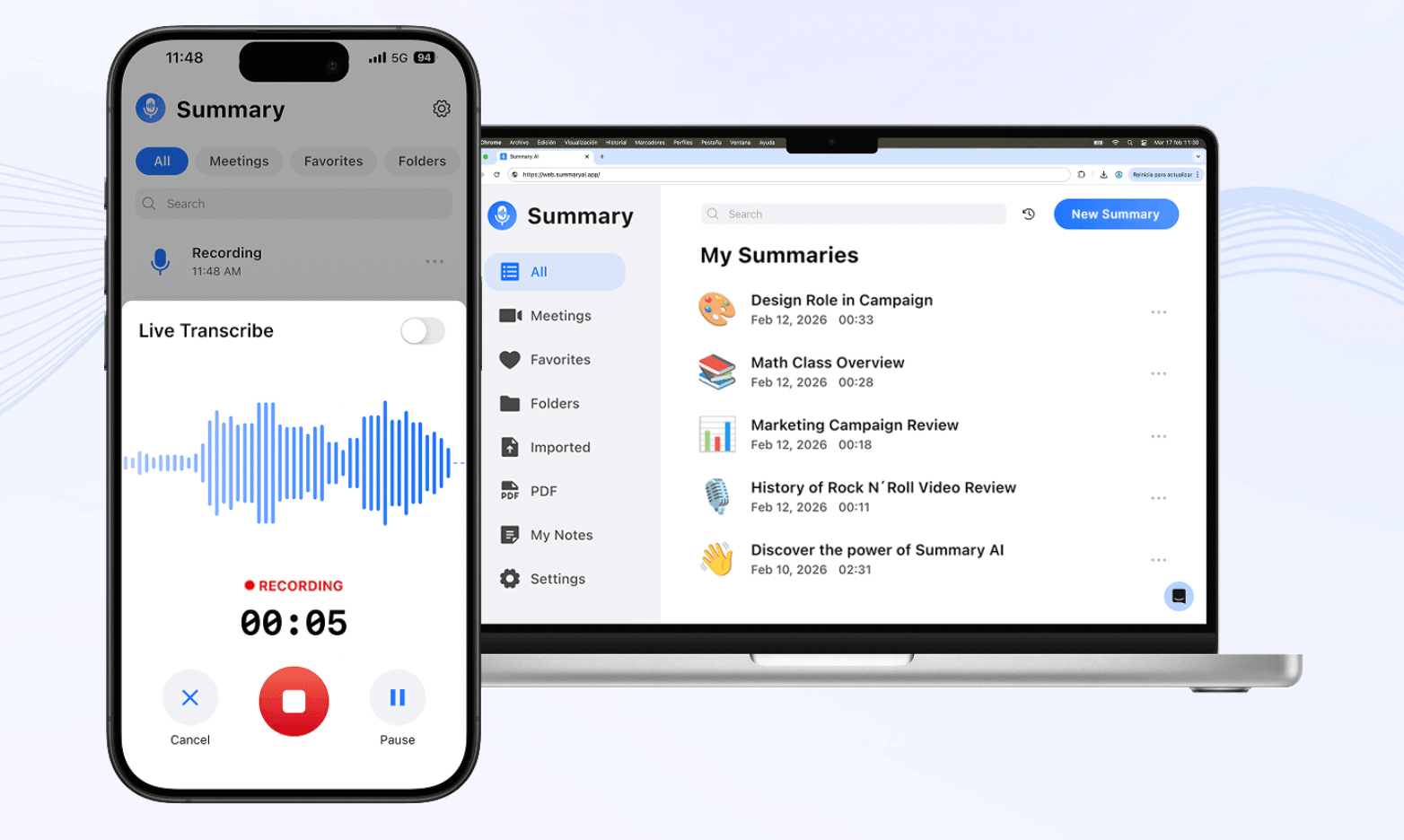
Summary AI is an AI note taker for turning conversations into notes, searchable transcripts, and translations. You can use it with Zoom, Google Meet, and Microsoft Teams or record conversations manually through your phone or browser.
Afterward, it creates a transcript with speaker identification and timestamps and pulls out decisions, action items, and follow-ups. It also supports live translation in more than 120 languages and AI Chat for searching one or several conversations.
You can also upload audio and video, record conversations of any duration, and extract text from PDFs and scanned documents with OCR.
What is Avoma?
Avoma is an AI meeting platform built mainly for sales, customer success, account management, and other customer-facing teams.
It records meetings, creates transcripts and summaries, identifies action items, and can send meeting information into CRM records. It also includes scheduling and AI-generated follow-up emails.
From there, you can add separate products for Conversation Intelligence, Revenue Intelligence, and lead routing. These add coaching, call scoring, deal analysis, forecasting, and other sales tools.
We found Avoma more focused on connecting customer conversations with the wider sales process.

Summary AI vs Avoma: Main differences
Both tools can create meeting notes and transcripts. The biggest differences are language support, CRM tools, sales features, and what happens after the meeting.
Notes, transcription, and translation
Both tools create transcripts, summaries, action items, and searchable meeting information. Summary AI supports more than 120 languages and includes live translation. Avoma supports more than 70 languages and can translate transcripts and notes. It also has custom note templates, Smart Topics, and follow-up emails.
So, Summary AI has stronger language support and Avoma gives sales and customer teams more ways to organize their meeting notes.
Recording, search, and meeting history
Summary AI can automatically join supported meetings or let you record manually, including in-person conversations. It also supports recordings of any length. Avoma has several ways to record meetings, including its meeting assistant, platform recordings, and bot-free desktop recording.
Both tools have AI search. Avoma’s “Ask Avoma” can also search across meetings, emails, deals, and playlists on supported plans.
We think Summary AI keeps recording features simpler, while Avoma gives customer-facing teams more ways to search across business information.
CRM, integrations, and sales workflows
CRM tools are one of Avoma’s biggest differences.
Avoma connects with Salesforce, HubSpot, Pipedrive, Zoho, Copper, and other CRM platforms. It can send notes, action items, pain points, competitor mentions, and next steps into customer records.
Summary AI is made for connecting with meeting and calendar tools.
So, if you want meeting information to update your CRM automatically, Avoma gives you many more options.
Coaching, forecasting, and scheduling
Avoma goes beyond meeting notes with extra paid features. Conversation Intelligence adds coaching, call scoring, scorecards, and talk analysis. Revenue Intelligence adds pipeline reviews, deal-risk signals, forecasting, and win-loss analysis. Avoma also includes scheduling, while Lead Router can qualify and send leads to the right person. Summary AI does not have the same sales-management tools.
We think these Avoma features are more useful for sales and revenue teams than for people who mainly need notes and transcription.
Files, privacy, and everyday use
Both tools let you upload audio and video files.
Summary AI also supports PDFs and OCR for scanned documents.
Avoma documents SOC 2 Type II, ISO/IEC 42001:2023, and GDPR. Summary AI explains its privacy practices and user rights in its privacy policy.
In everyday use, Summary AI keeps recording, transcription, translation, AI Chat, and files in one place, while Avoma becomes more advanced (and perhaps has a steeper learning curve) as you add CRM syncing, coaching, forecasting, and lead routing.

Summary AI vs Avoma pricing
Summary AI has weekly and yearly subscriptions. Avoma charges per recorder and sells several advanced sales products separately.
| Plan or add-on | Price |
|---|---|
| Summary AI Weekly | $8.99/week |
| Summary AI Yearly | $79.99/year |
| Avoma Startup | $29/recorder/month or $19 billed annually |
| Avoma Organization | $39/recorder/month or $29 billed annually |
| Avoma Enterprise | $39/recorder/month billed annually, 10-seat minimum |
| Conversation Intelligence | $35/seat/month or $29 billed annually |
| Revenue Intelligence | $35/seat/month or $29 billed annually |
| Lead Router | $25/seat/month or $19 billed annually |
The important difference is that Avoma’s advanced coaching, forecasting, and lead-routing features cost extra. Summary AI uses a simpler subscription, while Avoma’s total cost depends on which sales tools your team needs.
Who uses Summary AI vs Avoma?
You do not necessarily need the platform with more features. You need the one that matches what happens after your meetings.
| If you… | Consider |
|---|---|
| Need straightforward AI notes and transcripts | Summary AI |
| Regularly work across different languages | Summary AI |
| Need live translation | Summary AI |
| Record long interviews, lectures, or meetings | Summary AI |
| Want to work with PDFs and recordings | Summary AI |
| Need meeting notes synced to a CRM | Avoma |
| Want Salesforce or HubSpot automation | Avoma |
| Need sales coaching and scorecards | Avoma + Conversation Intelligence |
| Want pipeline and revenue forecasting | Avoma + Revenue Intelligence |
| Need scheduling or lead routing | Avoma |
From our comparison, Summary AI makes more sense if meetings are only one part of your work. You can use it for interviews, lectures, multilingual calls, long recordings, and documents within the same general workflow.
Avoma fits teams where customer meetings are closely connected with sales operations. A call can become meeting notes, update the CRM, feed into coaching, and eventually become part of pipeline and forecasting work.
That makes Avoma particularly relevant for sales, customer success, account management, and RevOps teams.
You can compare more options in our guide to the best AI meeting assistants.

Summary AI vs Avoma: Which should you choose?
After comparing the two platforms, we think the decision comes down to whether you want focused AI meeting notes or a wider sales workflow platform.
Summary AI makes more sense if you mainly want notes, searchable transcripts, and translation. It supports more than 120 languages, live translation, recordings of any duration, uploads, and PDF tools.
Avoma makes more sense if your customer meetings need to connect directly with CRM and revenue work. CRM synchronization, scheduling, coaching, forecasting, and lead routing give it a much wider business workflow, although several of those features cost extra.
As we see it, Summary AI focuses more on notes, transcription, translation, and different types of content. Avoma focuses more on customer meetings, CRM automation, coaching, and revenue workflows.

