

Summary AI and Bluedot both record meetings, write out what was said, make summaries, and find things people need to do. The difference, when comparing Summary AI vs Bluedot, is what they are best at.
Summary AI is mainly for notes, transcripts, and translation. You can use it for meetings, interviews, classes, calls, and in-person talks. It works with more than 120 languages and can translate live.
Bluedot is mainly for business meetings without a bot joining the call. It can record meetings, save video on some plans, make clips, look at who spoke, and send meeting notes to other work tools.
In simple terms, Summary AI is better for understanding and organizing what people said. Bluedot has more tools for video, team work, analytics, and integrations.
Key Facts
- Summary AI focuses on AI notes, transcription, and translation in more than 120 languages.
- Bluedot focuses more on bot-free recording, meeting video, speaker insights, and business integrations.
- Both work with Zoom, Google Meet, and Microsoft Teams and support online and in-person meetings.
- Summary AI costs $8.99 per week or $79.99 per year, while Bluedot has a limited free plan and paid plans starting at $14 per user per month when billed annually.
Summary AI vs Bluedot at a glance
| Feature | Summary AI | Bluedot |
|---|---|---|
| Best for | AI notes, transcription, translation, flexible recording | Bot-free recording, video, CRM workflows, teams |
| Starting paid price | $8.99/week or $79.99/year | Basic from $14/user/month billed annually |
| Free plan | No free plan | 5 meetings for life of account |
| Zoom, Google Meet, Microsoft Teams | Yes | Yes |
| Live transcription | Yes | Yes |
| AI summaries and action items | Yes | Yes |
| AI chat | Yes | Yes |
| Languages | 120+ | 100+ |
| Live translation | Yes | No |
| Bot-free recording | No | Yes |
| Optional meeting bot | Meeting Assistant can join | Yes |
| In-person recording | Yes | Yes |
| Mobile apps | iOS and Android | iOS and Android |
| Apple Watch | Yes | Yes |
| Recording length | Any duration | 1 hour Basic / no limit Pro |
| Video meeting recording | No comparable workflow | Pro and above |
| Clips | No | Yes |
| Speaker insights | Search | Yes |
| Audio and video uploads | Yes | Yes |
| PDF and OCR tools | Yes | No |
| CRM and ATS connections | Limited | Business |
| Slack and Notion automation | Limited | Yes |
| MCP connection | No | Yes |
| Enterprise security | Privacy controls | SOC 2 Type II, GDPR, SSO, SCIM |
As you can see, both tools cover meeting transcription and notes. The bigger difference is what happens afterward. Summary AI stays focused on notes, translation, and search, while Bluedot adds video, analytics, automation, and business integrations.
What is Summary AI?
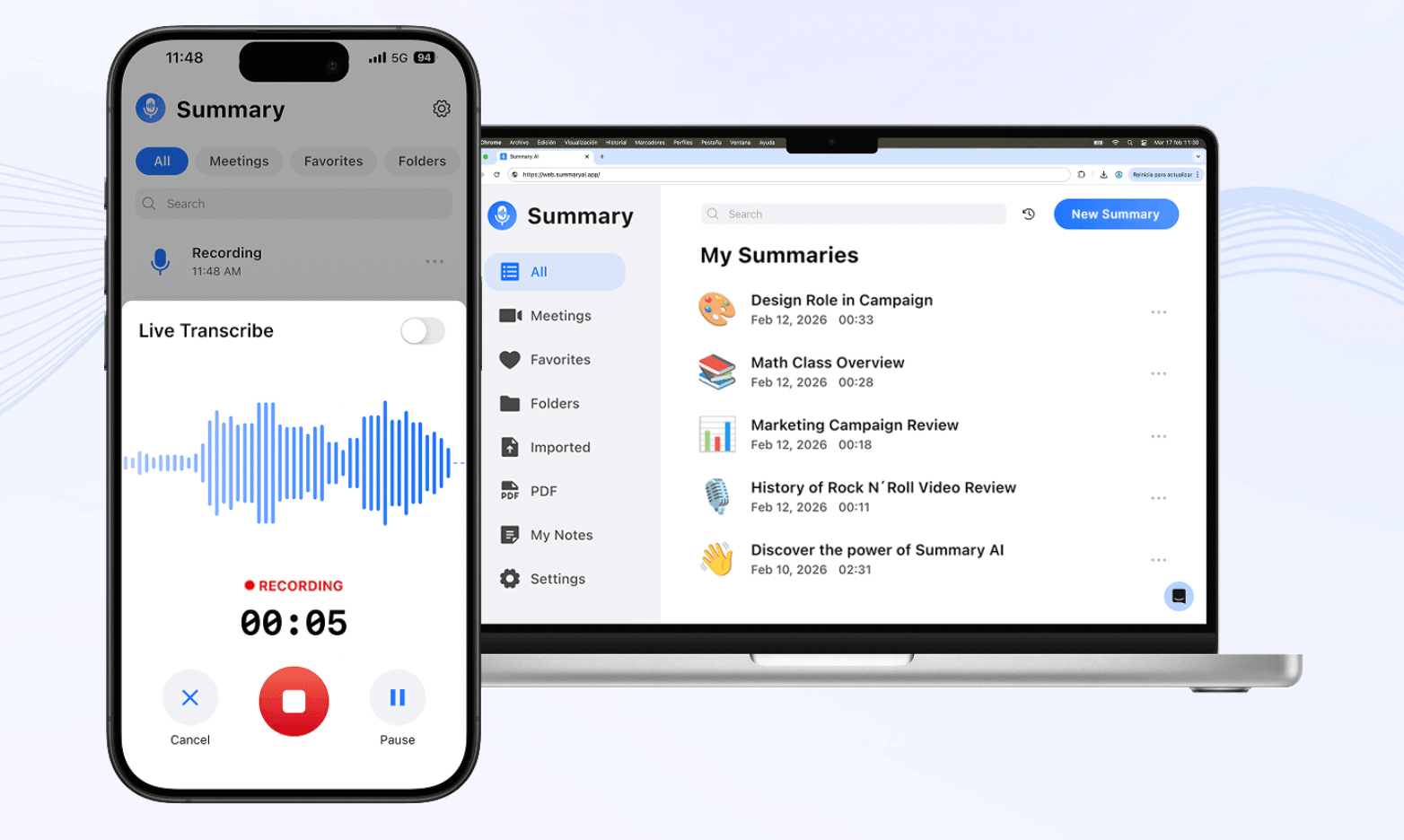
Summary AI is an AI meeting note taker and assistant for turning conversations into notes, searchable transcripts, and translations. You can use it with Zoom, Google Meet, and Microsoft Teams or record conversations manually from your phone or browser.
Afterward, it creates a transcript with speaker identification and timestamps and can pull out decisions, action items, and follow-ups. It also supports live translation in more than 120 languages and AI Chat for searching one or several conversations.
In addition, you can upload audio and video, record conversations of any duration, and extract text from PDFs with OCR.
Our guide to the best AI note takers covers more tools for turning conversations and other information into useful notes.
What is Bluedot?
Bluedot is an AI meeting recorder built mainly for business meetings. You can use it with Google Meet, Zoom, and Microsoft Teams through its Chrome extension, desktop apps, and mobile apps.
Its main difference is bot-free recording, so you can capture a meeting without another participant appearing on the call. Afterward, Bluedot creates a transcript, summary, decisions, action items, and speaker information.
Higher plans also add meeting video, clips, transcript-based editing, CRM connections, workflow automation, and more team features. We found it more focused on what businesses can do with recorded meetings after the call ends.

Summary AI vs Bluedot: Main differences
Both tools can make transcripts, summaries, and action items. The main differences we found are in recording, translation, video, speaker analytics, and integrations.
AI notes, transcription, and search
Both tools create searchable transcripts, summaries, decisions, and action items.
Summary AI has AI Chat, which lets you search through one or more conversations. Bluedot also has AI search, and its Pro plan lets you create custom note templates.
We found that Summary AI focuses more on the conversation itself. Bluedot gives you more control over how your business meeting notes are organized.
Translation and language support
Summary AI can transcribe and translate more than 120 languages. It can also translate live while people are speaking.
Bluedot supports transcripts and notes in more than 100 languages, but it does not have the same live translation feature.
So, we think Summary AI is a better fit if you often have conversations in different languages.
Bot-free and automatic meeting capture
Summary AI can automatically send its Meeting Assistant into supported meetings.
Bluedot can record meetings through its browser and desktop apps without adding a bot to the call. It can also use a bot in some situations.
If you want a tool that automatically joins meetings, Summary AI may be simpler. If you do not want a bot in your meetings, Bluedot gives you more options.
Mobile, desktop, and in-person recording
Both tools can record online and in-person conversations using mobile apps.
Summary AI uses the same system for notes, transcripts, translation, and search across your recordings.
Bluedot also has Mac and Windows apps, a Chrome extension, and Apple Watch support.
This means Bluedot gives you more ways to record meetings. Summary AI focuses more on what you can do with the conversation after it is recorded.
Video recording, clips, and speaker insights
Bluedot has more tools for meeting videos.
Its Pro plan includes video recording, clips, transcript-based editing, and no limit on recording length.
Its Speaker Insights feature can also show things like how much each person talked, how fast they spoke, how many questions they asked, and other speaker information.
Summary AI can identify different speakers, but it does not have the same video and speaker analysis tools.
We think Bluedot has the advantage if you often review sales calls, interviews, or customer conversations.
Integrations, CRM, and automation
Bluedot connects with tools like HubSpot, Salesforce, Slack, Notion, Zapier, Make, Google Drive, and calendar apps.
Its Business plan also includes CRM and ATS connections. MCP lets compatible AI tools access meeting information.
Summary AI mainly connects with meeting and calendar platforms.
This makes Bluedot more suitable if you need your meeting notes to connect with other business tools and workflows.
Files and more content
Both tools let you upload audio and video files.
Summary AI also supports PDFs and OCR technology. This means it can take text from documents and make it searchable.
Bluedot can import recordings from your computer, Google Drive, Zoom cloud recordings, and other sources depending on your plan.
So, Summary AI works with more types of documents, while Bluedot focuses more on meetings and recorded media.
Privacy and security
Summary AI explains how it handles data and user rights in its privacy policy.
Bluedot says it follows SOC 2 Type II and GDPR practices. It also says it does not use customer information to train its AI models.
Bluedot’s Business plan also includes SSO, SCIM, and controls for how long data is kept.
With either tool, you should check the recording-consent laws and rules before recording private or sensitive meetings.

Summary AI vs Bluedot pricing
Summary AI has weekly and yearly subscriptions. Bluedot has a limited free plan followed by Basic, Pro, and Business tiers.
| Plan | Price |
|---|---|
| Summary AI Weekly | $8.99/week |
| Summary AI Yearly | $79.99/year |
| Bluedot Free | $0 |
| Bluedot Basic | $18/user/month or $14/user/month billed annually |
| Bluedot Pro | $25/user/month or $20/user/month billed annually |
| Bluedot Business | $39/user/month or $32/user/month billed annually |
| Bluedot company plan | Pricing on request |
The main difference is structure. Summary AI keeps its notes, transcription, translation, and long recordings under one subscription. Bluedot adds more video, automation, integration, and team features as you move through its plans.
Which users suit Summary AI and Bluedot?
You do not necessarily need the platform with more features. You need the one that matches how you capture conversations and what you want to do with them afterward.
| If you… | Consider |
|---|---|
| Regularly work across different languages | Summary AI |
| Need live translation | Summary AI |
| Record long interviews, calls, or lectures | Summary AI |
| Want to work with PDFs as well as recordings | Summary AI |
| Prefer bot-free meeting capture | Bluedot |
| Want meeting video and clips | Bluedot |
| Need speaker analytics | Bluedot |
| Want CRM and ATS connections | Bluedot |
| Need automated meeting workflows | Bluedot |
From our comparison, Summary AI makes more sense if your conversations vary. You can use it for a client call, interview, lecture, or multilingual meeting and keep the same general workflow.
Bluedot fits teams that work mainly with business meetings. Bot-free recording, meeting video, clips, Speaker Insights, CRM connections, and automation can be useful for sales, recruiting, customer success, and management teams.
You can compare more options in our guide to the best AI meeting assistants.

Summary AI vs Bluedot: Which should you choose?
The main choice is deciding between features like live translation or other video and business workflows.
Summary AI is a better fit if you want AI meeting notes, searchable transcripts, and translation for meetings. It supports more than 120 languages, live translation, recordings of any length, mobile recording, file uploads, and PDF tools.
Bluedot is a better fit if you mainly use it for business meetings. It offers bot-free recording, video, clips, Speaker Insights, CRM connections, and automation.
In simple terms, Summary AI focuses more on notes, transcripts, and translation. Bluedot focuses more on bot-free meetings, video, speaker analytics, and business workflows.