

Google Meet and Zoom both do the basic job well. You can hold a video call, share your screen, and talk to people without being in the same room. The bigger difference is how each one fits into your workday.
Google Meet is a natural choice if you already use Gmail, Google Calendar, Drive, and Docs. Zoom is worth considering if you want a meeting platform with more tools for workshops, webinars, and online events.
For many teams, the decision comes down to convenience. Which app do people already know? What do you already pay for? And is anything actually missing from your current setup?
Here is a simple look at Google Meet vs Zoom, including free plans, paid features, recording, and AI meeting notes.
Google Meet vs Zoom at a glance
| Feature | Google Meet | Zoom |
|---|---|---|
| Best fit | Google Workspace users | Teams that want a dedicated meeting platform |
| Free participants | Up to 100 | Up to 100 |
| Free group meeting limit | 60 minutes | 40 minutes |
| Paid meeting length | Up to 24 hours | Up to 30 hours |
| Starting business price | $7/user/month, billed yearly | About $14.16/user/month, billed yearly |
| Recording | Business Standard and other eligible plans | Local recording; paid plans for cloud recording |
| Built-in AI | Gemini on eligible plans | AI Companion on eligible plans |
| Main work tools | Gmail, Calendar, Docs, and Drive | Zoom Workplace tools and integrations |
| Larger business meetings | 500 people on Business Plus | 300 people on Business |
| Main event strength | Everyday meetings within Google Workspace | Meetings, webinars, and organized events |
The starting prices do not tell the whole story. Google’s lowest business plan does not include the same recording features as its higher plans. Compare what you need before choosing by price alone.
What is Google Meet good for?
Google Meet works especially well when your team already spends most of the day in Google apps.

You can schedule a call in Calendar, send the meeting link, open a shared Google Doc during the discussion, and keep recordings in Drive on eligible plans.
That keeps meetings close to the information people already use. You do not have to introduce a separate system just to get everyone on a call.
Meet also works well for simple client meetings. Guests can open a link in a supported browser, which helps when they do not want to install another desktop app.
Free accounts support up to 100 people, with a 60-minute limit for calls involving three or more participants. Paid Workspace plans add higher limits and features such as recording, transcripts, and Gemini tools.
For a company already paying for Workspace, Meet may cover most everyday meeting needs.
What is Zoom good for?
Zoom makes sense when meetings are a major part of your work, especially if you run training, workshops, or online events.

Its tools include video meetings, chat, whiteboards, notes, tasks, recording, and AI features. Separate products also cover webinars, events, business phone service, and meeting rooms.
That gives you room to build a larger communication setup around Zoom if you need one.
For example, a training company might use regular meetings for small classes and a webinar product for larger presentations. A team that runs interactive workshops may value breakout rooms, polls, and host controls.
You can also use Zoom while keeping Gmail, Google Calendar, and Drive. Choosing Zoom does not mean moving all your other work away from Google.
The main question is whether you need those meeting and event tools enough to justify another subscription.
How the free plans compare
Both Google Meet and Zoom let you host free meetings with up to 100 people.
The biggest difference is time. Google Meet allows group meetings up to 60 minutes. Zoom Basic limits normal group meetings to 40 minutes.
If most of your calls last about an hour, Meet’s extra 20 minutes can make a real difference. You are less likely to stop a discussion just as everyone gets to the important part.
Google’s one-to-one meetings can also run much longer than its free group calls.
Zoom Basic gives you access to other parts of Zoom Workplace, too, including tools for chat, notes, and whiteboards.
For free group calls, though, Google Meet has the clearer advantage on meeting length. Check whether you need recording or other paid features before deciding that the free plan is enough.
Google Meet vs Zoom pricing
These are the main business plans to compare. Monthly prices below use yearly billing.
| Plan | Price per user per month | Meeting participants |
|---|---|---|
| Google Workspace Business Starter | $7 | Up to 100 |
| Google Workspace Business Standard | $14 | Up to 150 |
| Google Workspace Business Plus | $22 | Up to 500 |
| Zoom Basic | Free | Up to 100 |
| Zoom Pro | About $14.16 | Up to 100 |
| Zoom Business | About $18.33 | Up to 300 |
At first, Google looks much cheaper. But Business Starter does not include the full set of Meet recording and transcription tools.
Business Standard is a closer comparison with Zoom Pro. It includes recording, transcripts, more storage, and Gemini features. At $14 per user per month, it is almost the same price as Zoom Pro.
What you get around the meeting is the bigger difference. Google Workspace also covers business email, documents, shared files, and other work tools.
Zoom Pro focuses more on meetings and the wider Zoom Workplace setup. It includes meetings up to 30 hours, AI features, and 10 GB of cloud recording storage per user.
If your company needs the whole Google package, Workspace may offer better value. If you already have email and document tools sorted out, paying separately for Zoom may still make sense.
Comparing Google Meet and Zoom
To choose between Google Meet and Zoom, compare the two based on a few characteristics below.
Meeting length and group size
Paid Google Meet calls can last up to 24 hours. Zoom Pro and Business allow meetings up to 30 hours.
For most teams, that six-hour difference will not affect the decision. Either limit is more than enough for a normal work meeting. Group size is more important.
Google Workspace Business Standard supports up to 150 participants, compared with 100 on Zoom Pro. Business Plus raises Meet’s limit to 500, while Zoom Business supports 300.
Think about the meetings you actually run. A ten-person team does not need to choose based on a 500-person limit. A company hosting regular all-hands meetings might.
Also separate normal meetings from webinars. If you need registration, event controls, or a presentation format for a large audience, compare the relevant event products rather than participant numbers alone.
Joining through a browser
Google Meet is straightforward for browser meetings. Guests can open the link and join through a supported browser without installing a full desktop program.
Zoom also supports browser joining, though many people use its desktop app.
This may seem like a small detail until you spend the first ten minutes of a client call helping someone get connected.
Before choosing either platform, test the invitation and joining process with someone outside your organization. Check what they see, whether they need to sign in, and how your guest settings affect access.
Recording and transcripts
Google Meet recording is available on Business Standard and other eligible Workspace plans. Recordings are saved in Google Drive, which is convenient if that is already where you organize your files.
Transcripts are also available on supported plans. A transcript is the written version of what people said during the meeting.
Zoom supports local and cloud recording. Local recording saves the file on a device, while cloud recording keeps it online. Cloud recording requires a paid plan, and Zoom Pro and Business include 10 GB per licensed user. Our guide to recording a Zoom meeting explains the recording process in more detail.
Check what you need afterward, too. A video file is useful for replaying a discussion, but written text is easier to scan for a decision or deadline. Our comparison of the best AI transcription tools covers other ways to get that written record.
AI meeting notes
Both platforms offer AI tools that can reduce the amount of note-taking you do yourself.
On eligible Google plans, “Take notes for me” can create notes in Google Docs, highlight main points, and list decisions and next steps. Ask Gemini can also help summarize a meeting and answer questions.
Zoom AI Companion can create meeting summaries and answer questions during supported calls.
Google’s main convenience is where the notes go. If your team already works in Docs and Drive, having meeting notes there can make them easier to find and share.
Language support is another thing to check. Do not assume that every language supported for captions is also supported for AI notes or summaries. Check the specific feature and languages your team uses.
Whichever tool you choose, review important names, deadlines, and assigned tasks before sharing the notes. For a simple way to organize them, see our guide to taking effective meeting notes.
Workshops, webinars, and interactive calls
Both platforms offer meeting controls such as hand raising, reactions, and breakout rooms on supported plans. They also have tools for making calls more interactive.
Zoom puts a lot of attention on organized sessions, with polls, quizzes, whiteboards, breakout rooms, and host controls. Its separate Webinar and Events products cover larger online sessions with registration and event tools.
Google Meet also has useful interactive features on eligible plans. For an ordinary team discussion or client meeting, those may be all you need.
If you run workshops or webinars regularly, list the features you use during a real session. Check each one against the plan you are considering, including any separate event subscription.
Chat, files, and other work tools
Google Meet sits alongside Gmail, Google Chat, Calendar, Docs, and Drive. Its strength is fitting into a work setup your team may already know.
Zoom Workplace also goes beyond calls, with Team Chat, Docs, Clips, Tasks, Notes, and other tools. Zoom connects with products from Google, Microsoft, Salesforce, and other companies, too.
The useful question is where your team wants information to live. If people already keep project documents and discussions in Google, Meet may involve less change.
If your company uses a mixture of software, Zoom can still fit into that setup. You do not need to use every Zoom Workplace feature just because it is available.
Privacy and account controls
Both platforms have security features and business account controls. For most companies, the practical questions go beyond which brand feels safer.
Check who can join, who can record, where recordings are stored, and who can access them afterward. Also look at how long your company keeps recordings and transcripts.
If you have an IT team, ask them to check the account settings before moving important meetings. The right setup matters as much as the list of features on a pricing page.
Can Summary AI work with either platform?
Yes. If your video calls work well but meeting notes are still a headache, you may not need to switch platforms.
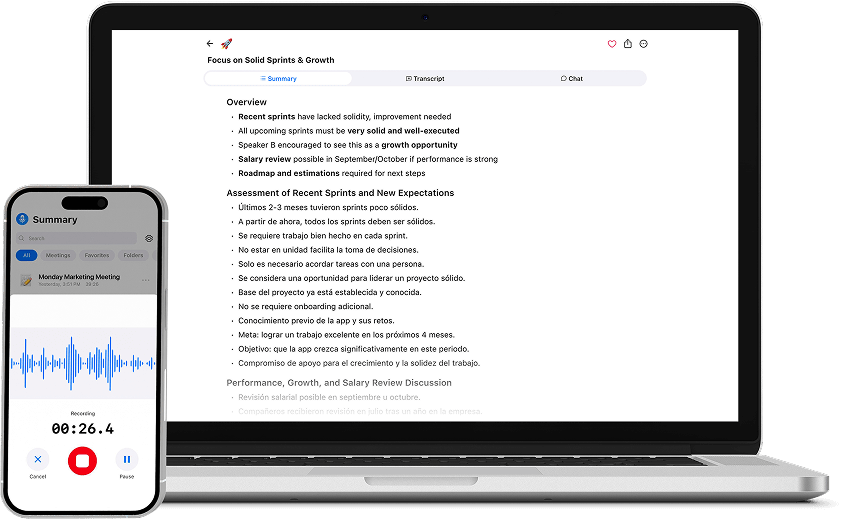
Summary AI works with supported Google Meet, Zoom, and Microsoft Teams calls. Its Meeting Assistant can create transcripts, summaries, decisions, follow-up tasks, and notes showing who said what.

It also supports more than 120 languages and live translation. That may help when your team needs a language or transcription setup that the built-in tools do not cover. Our guide to how AI translation works explains the basics.
Google Meet or Zoom still handles the video call. Summary AI handles the conversation record and notes. For more options, see our guide to the best AI meeting assistants.
Switching between Google Meet and Zoom
Test one real meeting before moving your regular calls. Check guest access, screen sharing, recording, and the notes you get afterward.
If you move from Zoom to Meet, make sure your Workspace plan includes the features you need. Save any Zoom cloud recordings you want to keep, then update recurring invitations in Google Calendar.
If you move from Meet to Zoom, connect your calendar and check recording, AI Companion, storage, and host settings. You can keep using Gmail, Docs, and Drive.
You can also keep both. Some teams use Meet internally and Zoom for customer calls or webinars. Use the arrangement that makes daily work easier.
Which one should you use with Summary AI?
Choose Google Meet if your team already works in Google Workspace and mainly needs straightforward meetings. Its longer free group calls and close connection with Google apps are useful advantages. Use Summary AI’s Google Meet recording software.
Choose Zoom if you want a dedicated meeting platform with a wider range of tools for workshops, webinars, and events. Use Summary AI’s Zoom recorder.
If your current platform works well, there may be little reason to move. Solve the specific problem you have, whether that is call length, event features, recording, or meeting notes.