

Evernote can do a lot. You can save notes, store documents, manage tasks, record meetings, and use AI to find information or summarize a conversation. But maybe you only use a few of those features. Or maybe you want something cheaper, simpler, or better suited to the way you work.
The good news is that you have plenty of choices. The trick is finding an app that solves your actual problem. If you need help taking meeting notes, Summary AI is worth a look. If you want notes, projects, and team documents in one place, Notion may make more sense. Obsidian and Joplin give you more control over your files, while Google Keep keeps things simple.
Here are eight Evernote alternatives, what each one does well, and what to check before moving your notes. If you want more options with AI features, see our guide to the best AI note-taking apps.
Evernote alternatives at a glance
| Tool | Best for | Free option | Starting paid price |
|---|---|---|---|
| Summary AI | Meeting notes and live translation | Short trial | $79.99/year |
| Notion | Projects and shared workspaces | Free plan | Plus: $10/user/month, billed yearly |
| Microsoft OneNote | Microsoft users | Free app | Microsoft 365 subscription optional |
| Obsidian | Notes stored on your device | Free app | Optional Sync: $4/month, billed yearly |
| Joplin | Open-source notes and moving from Evernote | Free app | Optional Cloud Basic: €2.99/month |
| Zoho Notebook | Visual notes and mixed content | Free plan | Check the upgrade page |
| Apple Notes | Apple users | Free app | Optional iCloud+: from $0.99/month |
| Google Keep | Quick notes and lists | Free | No separate paid plan |
These apps do different jobs. Summary AI helps capture and summarize conversations. Notion, OneNote, Obsidian, and Joplin are closer to Evernote as places to organize information over time.
That difference matters. A great meeting assistant will not necessarily replace years of notebooks, saved articles, and documents.
Why look for an Evernote alternative?
Evernote is still a useful app, especially if you like having lots of tools in one place. But its plan limits and pricing may not fit your needs.
The Free plan includes 50 notes, one notebook, one synced device, 1 GB of storage, and 250 MB of new uploads each month.
Starter raises that to 1,000 notes, 20 notebooks, three devices, and 5 GB of storage. It costs $14.99 per month or $99 per year.
Advanced costs $24.99 per month or $249.99 per year and removes most content limits, with some safeguards.
Evernote also offers AI meeting notes, an AI assistant, live transcription, and search that can understand the meaning of a question.
Those features may be useful. Still, if you mainly save shopping lists or write meeting notes, you might prefer an app built around that one job.
What should you look for?
Start by looking at the notes you already have. Are they mostly meeting summaries, research, PDFs, project plans, or quick reminders?
If you have years of saved information, focus on search and organization. Notion, OneNote, Obsidian, and Joplin are better suited to large collections than a simple list app.
If meetings are the main issue, look for reliable AI transcription. That means turning speech into written text. You may also want summaries, speaker labels, and a clear list of next steps.
For scanned documents, check for OCR. This lets an app recognize text inside an image or scan, so you can search it or work with the text.
Think about your devices, too. Apple Notes is convenient on a Mac and iPhone, but less helpful if you also use Android. OneNote is an easy option to consider if you already work in Microsoft 365.
Finally, check how you can move your existing notes. A good app still needs a workable way to bring over the information you care about.
1. Summary AI: Best for meeting notes
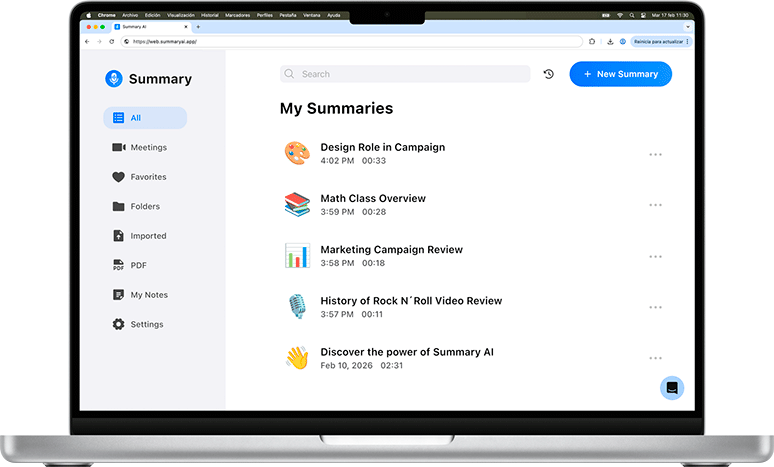
Summary AI is a good fit if your main problem is keeping up with conversations while trying to take useful meeting notes.
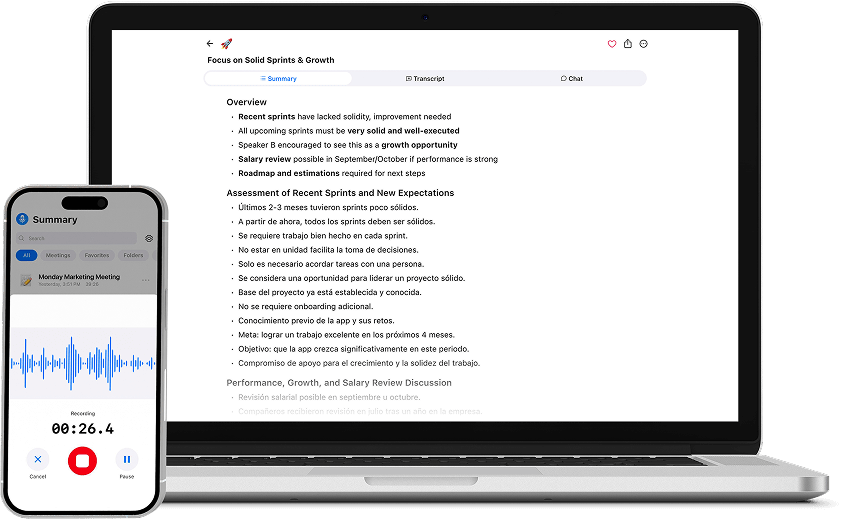
Its Meeting Assistant can automatically join supported Zoom, Google Meet, and Microsoft Teams calls. Afterward, you get a transcript showing who said what, plus shorter notes covering decisions, follow-up tasks, and key points.
For example, you can finish a client meeting and review the agreed next steps without reading the full conversation again.
Summary AI supports more than 120 languages and includes live translation. It also works with uploaded audio and video, and can extract text from PDFs and images.
Paid plans include unlimited audio transcription and recordings of any length.
Keep in mind that Summary AI focuses on conversations and transcription. It does not recreate Evernote’s notebooks, Web Clipper, task system, or large collection of reference material.
For more tools focused on calls, see our comparison of the best AI meeting assistants.
Price: $8.99 per week or $79.99 per year.
Need an Evernote alternative mainly for meeting notes? Try Summary AI.
2. Notion: Best for notes, projects, and teamwork
Notion makes sense if your notes are part of a bigger project.
You can keep documents, task lists, project pages, calendars, and shared team information together. It also has databases, which let you organize information into structured lists or tables.
Say you are planning a product launch. Your meeting notes can sit alongside deadlines, tasks, customer feedback, and background documents. People can find the information in the same workspace.
The tradeoff is setup time. Notion gives you plenty of ways to organize things, so you may need to decide how your pages and projects should fit together.
It also offers AI Meeting Notes. Regular access to that feature, Notion Agent, and Enterprise Search comes with Business and Enterprise. Free and Plus have more limited AI access.
Price: A free plan is available. With yearly billing, Plus costs $10 per user per month and Business costs $20.
3. Microsoft OneNote: Best for Microsoft users
OneNote is an easy choice to consider if you already use Outlook, Teams, Word, or other Microsoft tools.
It organizes notes into notebooks, sections, and pages. You can type anywhere on a page, add pictures, attach files, draw, or write by hand.
That makes it useful for mixed notes. A page might include a few typed paragraphs, a screenshot, a sketch, and an attached document.
The core app is free and works on Windows, Mac, the web, iPhone, iPad, and Android.
An optional Microsoft 365 Personal subscription includes 1 TB of OneDrive storage and other Microsoft apps. Copilot can also work with OneNote and Microsoft 365 information when you have the required plan.
If your work already lives in Microsoft apps, OneNote gives you a familiar place to keep your notes.
Price: The core app is free. Microsoft 365 Personal costs $9.99 per month or $99.99 per year.
4. Obsidian: Best for keeping notes on your device
Obsidian is worth considering if you want your notes stored as regular files on your own device.
It uses Markdown files, which are plain text files with simple formatting. The core app is free, does not require an account, and works offline.
You can link related notes together. For example, a note about a book can connect to notes about ideas, projects, or other books. Over time, those links can help you find connections across your research.
You can also add plugins and change the look of the app. That flexibility is useful, though it may take some time to find a setup you like.
Obsidian’s official Importer can bring in Evernote ENEX files and turn them into Markdown notes.
Price: The core app is free. Optional Obsidian Sync costs $4 per user per month with yearly billing or $5 month to month.
5. Joplin: Best open-source option
Joplin is a good choice if you want a traditional note app with more control over storage and syncing.
It is free and open source, which means its source code is publicly available. You get notebooks, tags, to-do lists, search, plugins, and a Web Clipper for saving content from websites.
Joplin works offline and gives you several ways to sync notes. You can use Joplin Cloud or services such as Dropbox, OneDrive, and Nextcloud.
It is also useful when moving from Evernote. Joplin can directly import Evernote ENEX files, including notes, attachments, tags, and much of the information attached to each note.
Some formatting may change during the move, so test a few notes first. Still, having a direct import option makes the process easier to work through.
Price: The app is free. Joplin Cloud Basic costs €2.99 per month or €28.69 per year. Pro costs €5.99 per month or €57.48 per year.
6. Zoho Notebook: Best for visual notes
Zoho Notebook is worth a look if you like organizing information visually.
It uses different note cards for text, pictures, audio, checklists, files, and other content. That gives you a simple way to keep different types of notes together.
The free Essential plan includes unlimited note creation, syncing across devices, sharing, and offline access. Personal Essential accounts have 500 MB of storage.
Eligible educational accounts can use a free Student Plan with 5 GB of storage and extra features.
Pro Plus adds tools such as text recognition in images, PDF annotation, AI summaries, mind maps, and 30 hours of AI audio and video transcription each month.
It is a useful option if your notes include a mix of text, images, files, and recordings.
Price: Free plans are available. Check the upgrade page for paid pricing, since it can vary by billing channel.
7. Apple Notes: Best for Apple users
If you mainly use an iPhone, iPad, and Mac, Apple Notes may already cover what you need.
You can organize notes into folders, add tags, share notes, scan documents, write by hand, and work with PDFs. It can also search scanned documents and handwriting.
Audio transcription is available on supported devices and in supported languages. On compatible devices, Apple Intelligence can summarize recorded audio, too.
That makes Apple Notes useful for more than quick reminders. You can keep written notes, scanned paperwork, and recordings in the same app.
The biggest limitation is device choice. It is less convenient if Windows or Android is a regular part of your day.
For someone who mostly uses Apple products, though, it is a simple option that fits naturally into the devices they already own.
Price: The app is free. Apple includes 5 GB of iCloud storage. Optional iCloud+ starts at $0.99 per month for 50 GB.
8. Google Keep: Best for quick notes and lists
Google Keep is a good choice if Evernote feels like more app than you need.
It handles short notes, checklists, reminders, labels, drawings, and images. You can also share notes with other people, which is handy for shopping lists or simple plans.
There is no separate paid subscription. You can use it with a Google account.
Keep reminders connect with Google Tasks and Calendar, so they can fit into the Google tools you already use.
The main thing to understand is that Keep is built for quick information. It is less suited to a large collection of detailed research, attached documents, and carefully organized notebooks.
If you mostly need somewhere to save an idea before you forget it, or a list you can check on your phone, that simplicity can be a real advantage.
Price: Free, with no separate paid plan.
How to switch from Evernote
Before moving anything, export the notebooks you care about and keep a backup. Then test a small group of notes in the new app.
Choose notes with different content: a PDF, a scan, an attachment, tags, links, and a page with unusual formatting. Check what arrives correctly and what needs fixing.
For Obsidian, export an Evernote notebook as an ENEX file and use the official Importer to turn it into Markdown notes.
Joplin can also import ENEX files directly. Much of your note information can move over, but Evernote’s OCR data does not transfer directly. Joplin can create new OCR information after import if that feature is enabled.
If you are switching to Summary AI, treat it as a new tool for meetings and transcription. Keep your older reference notes somewhere safe, since Summary AI does not rebuild your Evernote notebook collection.
For any other app, start small and check the available import process before moving everything.
Which Evernote alternative should you choose?
Think about what you do most often. Summary AI is our pick for meeting transcription, summaries, and live translation. Notion is a stronger fit for projects and team information. OneNote makes sense for Microsoft users, while Apple Notes is convenient for people using Apple devices.
Obsidian is worth considering if you want regular files on your device. Joplin suits people who want open-source software and flexible syncing. Zoho Notebook works well for visual notes, and Google Keep keeps everyday lists simple.
You can also use two tools together. You might use Summary AI for meetings and another app for documents and long-term notes. For a closer look at how the two apps differ, read our Summary AI vs. Evernote comparison.