

Taking notes sounds easy until you’re in a meeting trying to remember what your boss said while also writing everything down. And meetings aren’t the only problem. You’ve also got documents, research, random ideas, and to-do lists piling up everywhere. Luckily, you have many tools within reach, which brings you to this article, where we compare Summary AI vs Evernote.
At first, they seem pretty similar. Both can record conversations, turn speech into text, create AI summaries, and help you find information later. But there’s one big difference.
Summary AI focuses on capturing conversations. Evernote focuses on organizing and storing information.
And now that Evernote offers AI Meeting Notes, choosing between them isn’t quite as straightforward as it used to be. So which one should you use? I compared their features, pricing, meeting tools, and everyday uses to see where each platform makes the most sense. Here’s what I found.
Summary AI vs Evernote: Quick Comparison
Before getting into the details, here’s how their features compare.
| Feature | Summary AI | Evernote |
|---|---|---|
| AI meeting notes | Automatic meeting attendance available | Manually started AI Meeting Notes |
| Meeting transcription | Yes | Yes |
| AI summaries | Yes | Yes |
| Speaker identification | Yes | Yes |
| Action items | Extracted from conversations | Included in meeting summaries |
| Transcription languages | 120+ | 50+ |
| AI Chat | Questions about recordings | AI Assistant for notes and supported content |
| Searchable transcripts | Yes | Yes |
| Audio recording | Yes | Yes |
| Audio and video transcription | Yes | Supported file transcription |
| PDF and OCR | PDF text extraction | Text recognition and document search |
| Editable notes | Summary customization | Full note editing |
| Web access | Yes | Yes |
| Mobile apps | iOS and Android | iOS and Android |
My first thoughts: If I spent most of my day in meetings, I’d choose Summary AI. But if I needed somewhere to organize documents, research, and tasks, Evernote would make more sense. Let’s look at why.
1. Summary AI: Best for Meetings and Transcription
Best for: Professionals, students, consultants, journalists, and anyone who regularly records conversations.

What I like about Summary AI’s approach is how simple it is. You have a conversation, the app captures it, and afterward you get notes explaining what happened. You don’t need to spend the entire meeting typing or listen to an hour-long recording just to remember one important detail. That’s why it’s worth considering alongside the best AI note-taking apps for meetings and spoken content.
It can automatically join your meetings
This is probably Summary AI’s biggest advantage over Evernote.
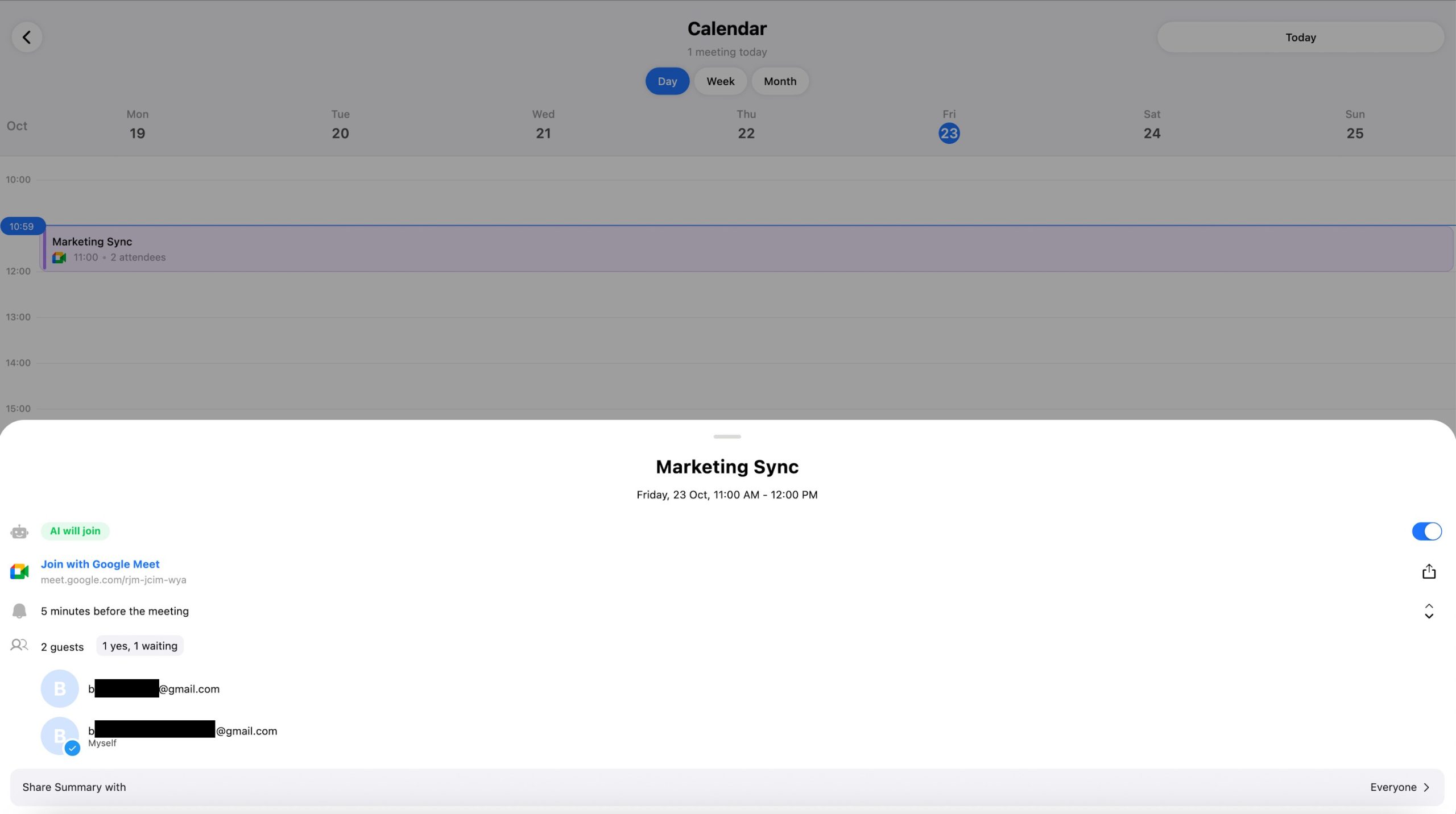
Its Meeting Assistant can automatically join selected Zoom, Google Meet, and Microsoft Teams calls through a connected calendar.
Imagine you have four meetings on Monday. Normally, you’d need to remember to start recording, take notes, and track everything people promise to do.
With Summary AI, the assistant can capture the meeting and create a summary afterward.
You can review:
- Important discussion points
- Decisions and action items
- Follow-up tasks
- Speaker information
- The complete transcript
Evernote also offers AI Meeting Notes, but you need to start its recording workflow yourself. For someone attending several meetings every day, that makes a big difference.
Live transcription and translation
Another feature that stands out is the amount of languages supported. Summary AI can transcribe more than 120 languages and offers live translation during conversations. Imagine attending a meeting with international clients. You understand most of what’s being said, but occasionally someone uses a phrase you don’t recognize. Summary AI can help you follow the conversation as it happens.
Evernote supports transcription in more than 50 languages, but it doesn’t have a dedicated live meeting translation feature.
If you regularly work with multiple languages, I’d give Summary AI the advantage. For more options, check out Summary AI’s comparison of the best AI transcription tools.
AI Chat saves time
Let’s say you finished a long meeting last week and can’t remember the deadline everyone agreed on.
Instead of listening to the recording again, you can ask Summary AI’s AI Chat, “When did we agree to finish the project?” You can also ask about assigned tasks, decisions, or specific comments. That’s much easier than searching through a long transcript manually.
Summary AI also supports uploaded audio, video, and PDFs, making it useful beyond live meetings.
Pros
- Automatically joins supported online meetings.
- Creates transcripts, summaries, and action items.
- Supports live translation in 120+ languages.
- Lets you ask questions about recordings.
- Works with meetings, interviews, lectures, and uploaded files.
Cons
- Doesn’t offer Evernote’s advanced notebook organization.
- No equivalent built-in Web Clipper.
- Has a limited free trial rather than a permanent free plan.
My verdict on Summary AI
If I needed an app mainly for meetings and conversations, Summary AI would be my first choice based on its features. The automatic meeting assistant, transcription, translation, and AI summaries make it especially useful for people who spend a lot of time talking to others. Try Summary AI!
2. Evernote: Best for Organizing Notes and Documents
Best for: Students, researchers, writers, freelancers, and people who want one place to store information.
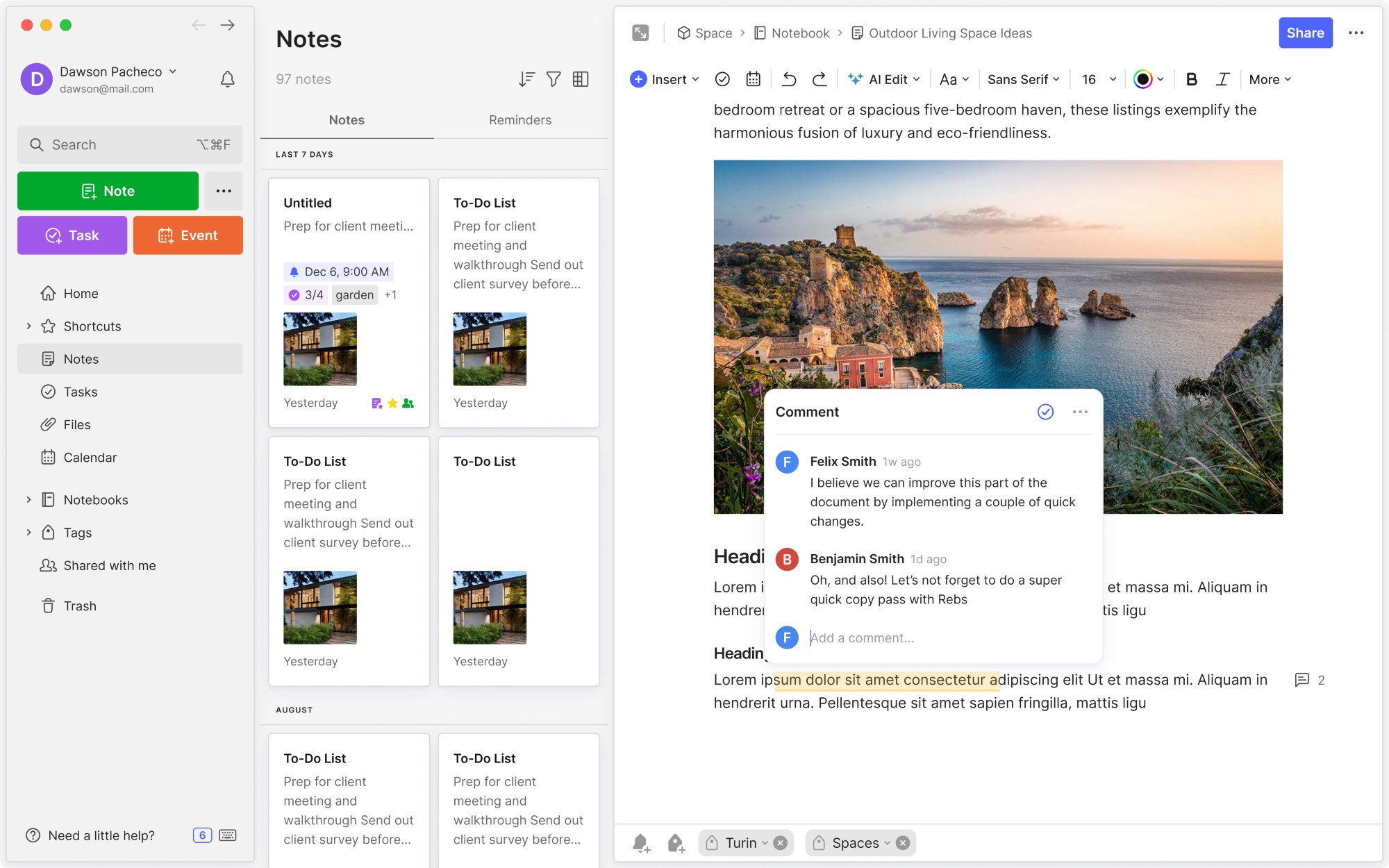
Evernote takes a different approach and instead of focusing mainly on conversations, it helps you organize almost everything: notes, documents, webpages, research, images, reminders, and tasks. Think of it as a digital filing cabinet that you can search whenever you need something.
Notebooks and tags make organizing easier
This is where Evernote really stands out. You can create notebooks for work, college, personal projects, or anything else you’re managing.
Let’s say you’re working with three clients. You could create a notebook for each one and keep their documents, research, meeting notes, and tasks together. You can also add tags to make everything easier to find.
Summary AI organizes your recordings and summaries, but Evernote provides a more complete system for storing information long-term. If you struggle with messy notes, exploring different note-taking methods can also help.
Web Clipper is a useful extra
Evernote’s Web Clipper lets you save useful webpages directly into your notebooks.
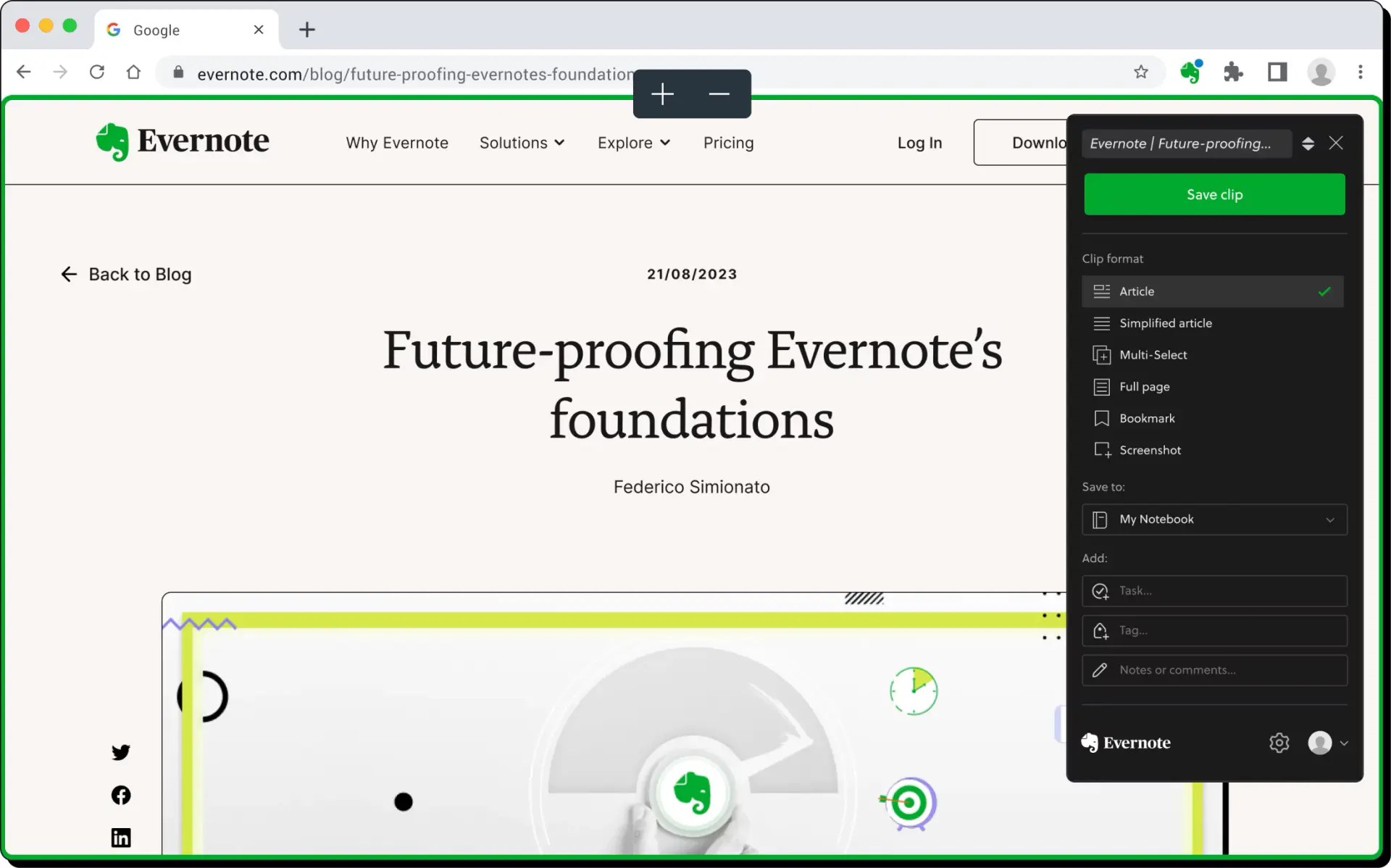
Imagine researching a topic and finding five helpful articles. Instead of keeping dozens of browser tabs open, you can save them into Evernote.
Later, you can search through those pages alongside your own notes. That’s particularly useful for writers, students, and researchers who constantly collect information online.
Tasks, calendars, and document search
Evernote also includes task management features. You can create tasks, set deadlines, and add reminders.
It supports calendar connections, too. For example, after a project meeting, you could save the notes and create tasks for everything your team needs to finish.
Evernote can also search text inside supported PDFs, scanned pages, images, and handwriting. That becomes useful when you’ve collected hundreds of notes and can’t remember where something was saved.
Its AI-powered search features can also help locate relevant information without requiring the exact original wording.
Pros
- Excellent notebooks and tags.
- Web Clipper for saving online research.
- Tasks, reminders, and calendar tools.
- Searchable documents and handwritten notes.
- AI Meeting Notes and an AI Assistant.
Cons
- You still need to organize much of your information.
- The free plan has tight limits.
- Paid plans can be expensive.
- Meeting capture requires more manual involvement.
What do users say about Evernote?
Evernote has been around for years, so there’s plenty of customer feedback.
On G2’s Evernote reviews, users praise its organization features, ease of use, and ability to keep information in one place. However, some reviewers complain about subscription costs, restrictions on the free plan, and syncing problems.
My verdict on Evernote
Evernote is the app I’d choose if I wanted one place to store and organize information for years. It’s better suited to managing a large collection of notes and documents than simply capturing conversations. But its newer AI features make it a stronger competitor than you might expect.
3. Which Is Better for Meeting Notes?
My pick: Summary AI.
Both platforms can transcribe meetings, recognize speakers, and generate summaries. The biggest difference is how the recording starts.
Summary AI can automatically join selected online meetings. Evernote requires you to start the capture workflow yourself. Recording length is another difference.
Summary AI advertises recordings of any duration on paid plans. Evernote’s AI Meeting Notes documentation lists a limit of 120 minutes or 200 MB per recording. For a normal 30-minute call, either app could work.
But for longer workshops, interviews, and lectures, Summary AI offers a more flexible published recording allowance. There’s also translation. Summary AI’s live translation and 120+ transcription languages make it more appealing for international meetings.
Evernote is useful when you want the meeting transcript and summary saved directly inside your existing notebook system. So if I mainly wanted someone to take notes during meetings, I’d choose Summary AI.
If I already used Evernote every day and only recorded occasional meetings, its built-in feature might be enough. For more tools that turn long conversations into shorter recaps, see this guide to AI summary tools.
4. Which App Is Better for Students and Researchers?
My pick: It depends on what you’re doing.
Let’s say you’re attending a two-hour college lecture. You want to pay attention, understand the topic, and get useful notes afterward. Summary AI makes sense because it can record the lecture, create a transcript, and summarize the important points.
But imagine you have five classes, dozens of PDFs, assignments, research articles, and handwritten notes.
That’s where Evernote becomes more useful. You can organize everything into notebooks for different subjects or projects. The same applies to researchers. Summary AI can help capture interviews, while Evernote can store those notes alongside research papers and other documents.
If studying is your main concern, this guide to student productivity tools is also worth reading. The easiest way to choose is to ask whether you need help capturing information or organizing it afterward.
5. Can You Use Summary AI and Evernote Together?
Yes. And for some people, using both might make the most sense. Imagine you’re a consultant preparing for a client meeting. Before the call, you use Evernote to organize background research, documents, and questions.
During the meeting, Summary AI captures the conversation and generates a transcript. Afterward, you review the summary and action items, then copy the important information into the client’s Evernote notebook.
Now everything is organized alongside the client’s other documents and tasks. That’s a useful combination. Just remember that this doesn’t mean there’s a built-in direct integration. You may need to copy or export information between the apps.
Summary AI helps capture the conversation. Evernote helps organize what happens afterward.
6. Summary AI vs Evernote Pricing
Pricing is another important difference.
| Plan | Advertised US price |
|---|---|
| Summary AI Weekly | $8.99/week |
| Summary AI Yearly | $79.99/year |
| Evernote Free | $0 |
| Evernote Starter | $14.99/month or $99/year |
| Evernote Advanced | $24.99/month or $249.99/year |
Prices may change depending on promotions, location, and billing method.
Summary AI pricing
Summary AI offers a short trial and paid subscriptions. Its annual plan costs $79.99 and includes transcription, meeting tools, language support, and file uploads. That’s cheaper than Evernote Starter’s advertised US annual price. Check Summary AI pricing
Evernote pricing
Evernote has a free plan, but it comes with restrictions. The free plan includes 50 notes, one notebook, and syncing on one device. Starter increases the limits to 1,000 notes and 20 notebooks. Advanced offers unlimited notes and notebooks, subject to safeguards.
Which offers better value?
If meetings and transcription are your main priorities, I’d choose Summary AI. If you need a complete system for organizing documents, tasks, and research, Evernote could justify its price. It really depends on which features you’ll use most.
Final Verdict: Summary AI or Evernote?
After comparing both platforms, I don’t think there’s one winner for everyone.
Summary AI is my pick for meetings, transcription, and live translation. Evernote is my pick for organizing notes, research, documents, and tasks.
If my day involved back-to-back Zoom calls, I’d choose Summary AI. Its automatic meeting assistant and AI summaries would save me from constantly taking notes. But if I were managing lots of research, documents, and personal projects, I’d lean toward Evernote. You could also use both if your work involves plenty of conversations and lots of information to organize afterward.
The best app isn’t necessarily the one with the most features. It’s the one that saves you the most time doing what you already do every day. Want automatic meeting notes? Try Summary AI.