





Summary AI vs Notion is a comparison between two different kinds of platforms made for different kinds of tasks. Summary AI is made for recording meetings, transcribing conversations, generating AI summaries, finding action items, and translating speech in real time. You can use it for online meetings, interviews, lectures, phone calls, and in-person conversations.
Notion is a workspace for organizing work and creating a knowledge base. Teams use it for projects, tasks, documents, databases, calendars, wikis, and keeping other information. It does also include AI features and AI Meeting Notes, which is where it can be similar to Summary AI, but not the same.
In practice, out of the two platforms, Summary AI is the one that is more focused on capturing and understanding conversations, while Notion is more focused on organizing information and connecting it with the rest of your work.
Key Facts
- Summary AI focuses on meeting recording, transcription, AI summaries, action items, and live translation.
- Notion is a workspace for projects, tasks, documents, databases, calendars, and company knowledge.
- Both can create meeting transcripts, summaries, and action items.
- Summary AI can automatically join supported meetings and supports live translation in more than 120 languages.
- Notion AI Meeting Notes sits inside a much larger project and knowledge-management platform.
- Summary AI costs $8.99 per week or $79.99 per year.
- Notion has a free plan, while regular AI Meeting Notes are available through its Business plan.
Where Summary AI and Notion fit
The clearest way to understand the two platforms is to look at what each one is mainly designed to do.
| Platform | Main purpose | Typical use |
|---|---|---|
| Summary AI | Meeting recording, transcription, AI notes, action items, and translation | Record a meeting or conversation and turn it into searchable notes |
| Notion | Projects, tasks, documents, databases, and team knowledge | Organize work, manage projects, store information, and connect meeting notes with ongoing work |
Summary AI is mainly a meeting and conversation tool.
Notion is mainly a workspace and knowledge-management platform.
Their features overlap when it comes to meeting notes, but the wider products are very different.
What is Summary AI?
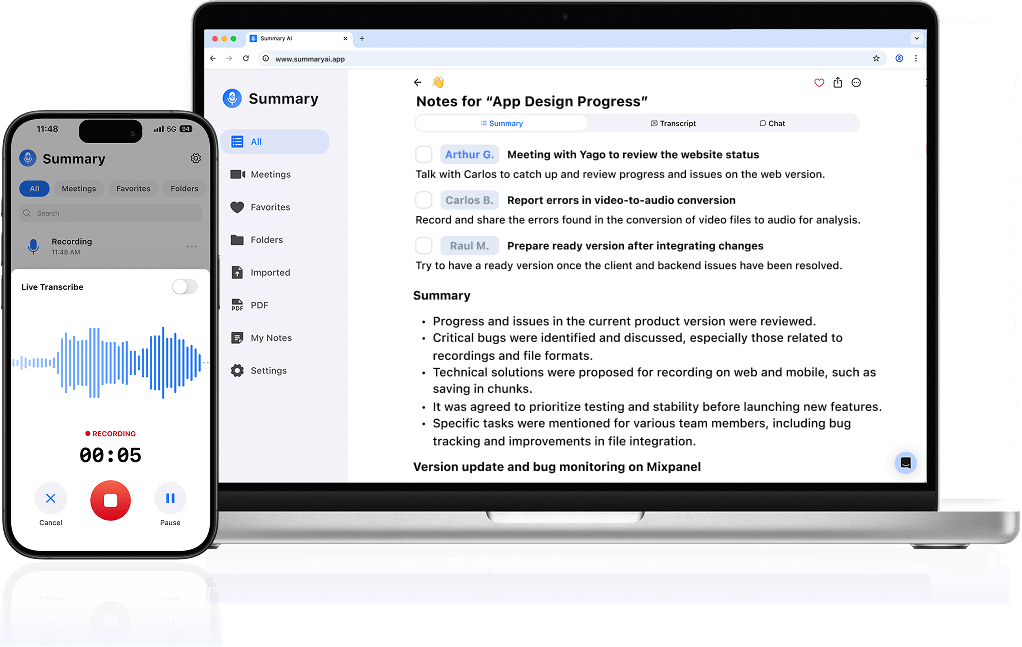
Summary AI is an AI note-taker and transcription platform. Its main features are transcribing your meetings and turning them into useful information in the form of summaries with action items and key points extracted.
Meeting recording
Summary AI can capture online and in-person conversations.
Its Meeting Assistant can join supported Zoom, Google Meet, and Microsoft Teams calls automatically.
You can also record manually from your phone or browser.
This makes it useful for:
- Team meetings
- Client calls
- Interviews
- Lectures
- Phone calls
- In-person conversations
Transcription and AI summaries
After a conversation, Summary AI creates a transcript with speaker information and timestamps.
It can also automatically identify:
- Key points
- Decisions
- Action items
- Follow-ups
- Meeting summaries
This means you can review the important information without going back through the whole recording.
Live translation
Summary AI supports transcription and translation in more than 120 languages.
It can also translate conversations while people are speaking.
This makes it particularly useful for international meetings, multilingual interviews, and conversations where participants speak different languages.
AI Chat
AI Chat lets you search one or several conversations.
You can use it to find things such as:
- A decision from a meeting
- Something a client said
- A task assigned to someone
- A follow-up discussed across several calls
Audio, video, PDFs, and OCR
Summary AI also supports uploaded audio and video files.
Its PDF and OCR tools can extract text from PDFs and scanned documents.
Overall, Summary AI is mainly designed for recording conversations and turning them into transcripts, summaries, action items, translations, and searchable information.
What is Notion?
Notion is an all-in-one workspace for organizing information and work. Meeting notes are only one part of the platform.

Documents and knowledge
Notion lets you create and organize documents, notes, guides, processes, and company knowledge.
Teams can use it as a wiki for things such as:
- Policies
- Processes
- Project documentation
- Meeting notes
- Research
- Internal guides
Projects and tasks
Notion also includes tools for managing projects and tasks.
You can create:
- Task databases
- Project pages
- Kanban boards
- Calendars
- Timelines
- Status views
- Assigned work
This makes Notion useful when you are doing the actual work you decided on in the meeting. It gives you all of the tools you need to plan projects and execute them.
Databases
Databases are one of Notion’s main features.
You can use them to organize things such as:
- Projects
- Customers
- Content
- Hiring
- Tasks
- Product roadmaps
- Meeting records
The same information can be shown in tables, boards, calendars, lists, and other views.
AI Meeting Notes
Notion also includes AI Meeting Notes.
It can transcribe a meeting, create a summary, and identify action items.
Notion AI and search
Notion AI can work across workspace content.
That means you can search meeting notes alongside:
- Project pages
- Documents
- Databases
- Company knowledge
- Other workspace information
On applicable plans, AI Connectors can also search information from tools such as Slack, Microsoft Teams, Google Drive, Jira, GitHub, Gmail, Outlook, and Google Calendar.
Overall, Notion is mainly designed for organizing work, documents, projects, tasks, and shared team knowledge.

Summary AI vs Notion: Where they overlap
Although Summary AI and Notion are different types of products, there is some overlap around meeting notes.
Meeting transcription
Both platforms can transcribe meetings.
Summary AI can automatically send its Meeting Assistant into supported calls.
Notion uses bot-free capture through its desktop app and needs to be started by the user.
So, Summary AI is more focused on automatically capturing the meeting, while Notion keeps the transcript inside the workspace where other work already lives.
AI summaries and action items
Both tools can turn a meeting transcript into a summary and identify action items. The main difference is what you do with that information afterward. Summary AI keeps the information centered around the conversation and recording. Notion can connect the action items and decisions with projects, tasks, databases, and documents.
Search
Summary AI’s AI Chat is mainly for searching meetings and recordings.
Notion AI can search meeting notes together with other workspace content.
For example, a question in Notion could pull information from a meeting page, a project document, and a database. That makes Notion’s search broader, while Summary AI’s search remains more focused on conversations.
Where Summary AI is more meeting-focused
Summary AI has several features that are specifically designed around meetings and recordings.
Automatic meeting attendance
Summary AI’s Meeting Assistant can automatically join calls when you add them to your calendar. Notion AI Meeting Notes needs to be started by the user.
This can make Summary AI more convenient if you want meetings captured without having to remember to start the note-taking tool every time.
Live translation
Summary AI supports live translation in more than 120 languages. Notion AI Meeting Notes does not have the same live translation. This means Summary AI is the way to go for international, multilingual meetings.
Recording outside scheduled meetings
Summary AI can also be used for interviews, lectures, calls, and face-to-face conversations.

Where Notion goes beyond meeting notes
Meeting transcription is only a small part of what Notion does.
Project management
Notion can turn meeting decisions into ongoing project work.
For example, you can:
- Turn an action item into a task
- Assign it to a team member
- Add a deadline
- Connect it to a project
- Track its status
Summary AI can identify the action item, but it is not designed to manage the full project around it.
Documents and team knowledge
Notion can store meeting information alongside project documentation, processes, research, and company knowledge. A decision from a meeting can become part of a project page. A new process can be added to a team wiki. Client information can be stored with the customer’s other records.
Databases and structured information
Notion databases let teams organize meeting information in structured ways.
For example, you could keep a database of:
- Customer meetings
- Interview notes
- Project decisions
- Research calls
- Weekly team updates
Those records can then connect to other projects, tasks, people, and documents.
Connected workspace search
Notion AI can search beyond meeting notes and bring together information from different parts of the workspace. On supported plans, AI Connectors can expand that search into other work apps.
This makes Notion more useful when meeting information needs to become part of a wider company knowledge system.
How Summary AI and Notion can work together
Because they are built for different jobs, the two tools can fit into the same workflow.
For example:
- You have a client meeting on Zoom.
- Summary AI records and transcribes the conversation.
- It creates a summary, decisions, and action items.
- You review the transcript and notes.
- The useful information is moved into the relevant Notion project or client page.
- Action items become tasks with owners and deadlines.
- Important decisions stay connected with the project’s other documents and information.
This lets Summary AI handle the meeting capture and transcription, while Notion handles the ongoing work and organization.
Summary AI and Notion pricing
The prices reflect the fact that these products are selling different types of tools.
Summary AI pricing
| Plan | Price |
|---|---|
| Weekly | $8.99/week |
| Yearly | $79.99/year |
Summary AI’s subscription focuses on meeting recording, transcription, translation, uploads, and AI note-taking features.
Notion pricing
| Plan | Price |
|---|---|
| Free | $0 |
| Plus | $12/member/month or $10/member/month billed annually |
| Business | $24/member/month or $20/member/month billed annually |
| Enterprise | Custom pricing |
Notion Free and Plus give you access to the wider workspace for documents, databases, projects, and wikis. Regular AI Meeting Notes are tied to the Business plan. Business also includes Notion AI, Enterprise Search, private teamspaces, and more advanced permissions.
The pricing is therefore not directly comparable. Summary AI is charging mainly for a meeting and transcription product. Notion is charging for a broader workspace for projects, documents, databases, AI, and team knowledge.
When to use Summary AI vs Notion
Summary AI makes sense when spoken conversations are an important source of information.
For example, you may want to:
- Automatically record online meetings
- Transcribe interviews
- Record lectures
- Capture client calls
- Record in-person conversations
- Find decisions and action items
- Search previous meetings
- Translate conversations in real time
- Work across many spoken languages
Its main job is to make conversations easier to capture, understand, search, and review.
When to use Notion vs Summary AI
Notion makes sense when you need a central place to organize work and information.
For example, you may want to:
- Manage projects
- Assign tasks
- Build databases
- Write documents
- Create a company wiki
- Store meeting notes
- Organize client information
- Manage research
- Search team knowledge
- Connect information across different areas of work
Its main job is to give teams one place to organize and use information.

Using Summary AI and Notion together
The combination can make sense for people who spend a lot of time in conversations but also need somewhere to manage the work afterward.
Consultants
Consultants can record client calls with Summary AI and keep final decisions, tasks, and project information inside Notion.
Recruiters
Recruiters can use Summary AI to capture interviews and Notion to organize candidate information, hiring notes, and next steps.
Students
Students can record lectures or interviews with Summary AI and organize class notes, research, and projects in Notion.
Managers
Managers can capture meetings with Summary AI and use Notion to manage project plans, decisions, tasks, and documentation.
International teams
Teams working across languages can use Summary AI for live translation and transcription, then keep the important information in shared Notion pages.
Summary AI vs Notion: Which should you use?
Summary AI vs Notion are not really substitutes for one another. Summary AI is the more relevant tool if you need to record meetings, transcribe conversations, create AI summaries, identify action items, or translate speech in real time.
Notion is the more relevant tool if you need to manage projects, organize tasks, create documents and databases, or build a shared knowledge workspace. There is some overlap because Notion also offers AI Meeting Notes.
However, meeting transcription is one feature inside a much larger Notion workspace, while it is the main focus of Summary AI. For some users, using both may make more sense than choosing between them. While Summary AI handles the meeting and creates your AI meeting notes, Notion can help organize the work and information that comes out of it.

