





When comparing these two platforms, it comes down to a simple question: would you rather record your conversations and meetings with a separate recording device you carry with you or use only software? Summary AI vs PLAUD AI is just that. It is mainly a choice between a software-based meeting tool and a hardware-based recording setup.
With Summary AI, you use your phone or computer with a meeting platform like Zoom, Meet, or Teams. It can record conversations, create transcripts and AI summaries, find action items, and translate speech live in more than 120 languages.
PLAUD AI, on the other hand, takes a different approach. It combines AI transcription software with a physical recording device such as the Plaud Note, Note Pro, NotePin, and NotePin S.
So, while Summary AI is better if you want a simple software workflow, PLAUD AI makes more sense if you specifically want a physical recorder or wearable.
Key Facts
- Summary AI focuses on software-based recording, transcription, AI notes, and live translation.
- PLAUD AI combines transcription software with its own recording hardware.
- Both can create transcripts, summaries, action items, speaker labels, and AI answers.
- Summary AI supports more than 120 languages and live translation.
- PLAUD AI supports more than 112 transcription languages.
- Summary AI costs $8.99 per week or $79.99 per year.
- PLAUD hardware starts at $159, while paid AI plans start at $99.99 per year.
Where Summary AI and PLAUD AI fit
The easiest way to understand the difference is to look at how each one records conversations.
| Platform | Main purpose | Typical use |
|---|---|---|
| Summary AI | Software-based meeting recording, transcription, AI notes, and live translation | Record meetings, interviews, lectures, calls, and in-person conversations using your phone or computer |
| PLAUD AI | Plaud recording hardware with AI transcription and summaries | Use a separate recorder or wearable for phone calls, interviews, meetings, and hands-free recording |
Summary AI is useful if you want to record and transcribe conversations without buying another device.
PLAUD AI is useful if you want purpose-built recording hardware as part of your workflow.
What is Summary AI?
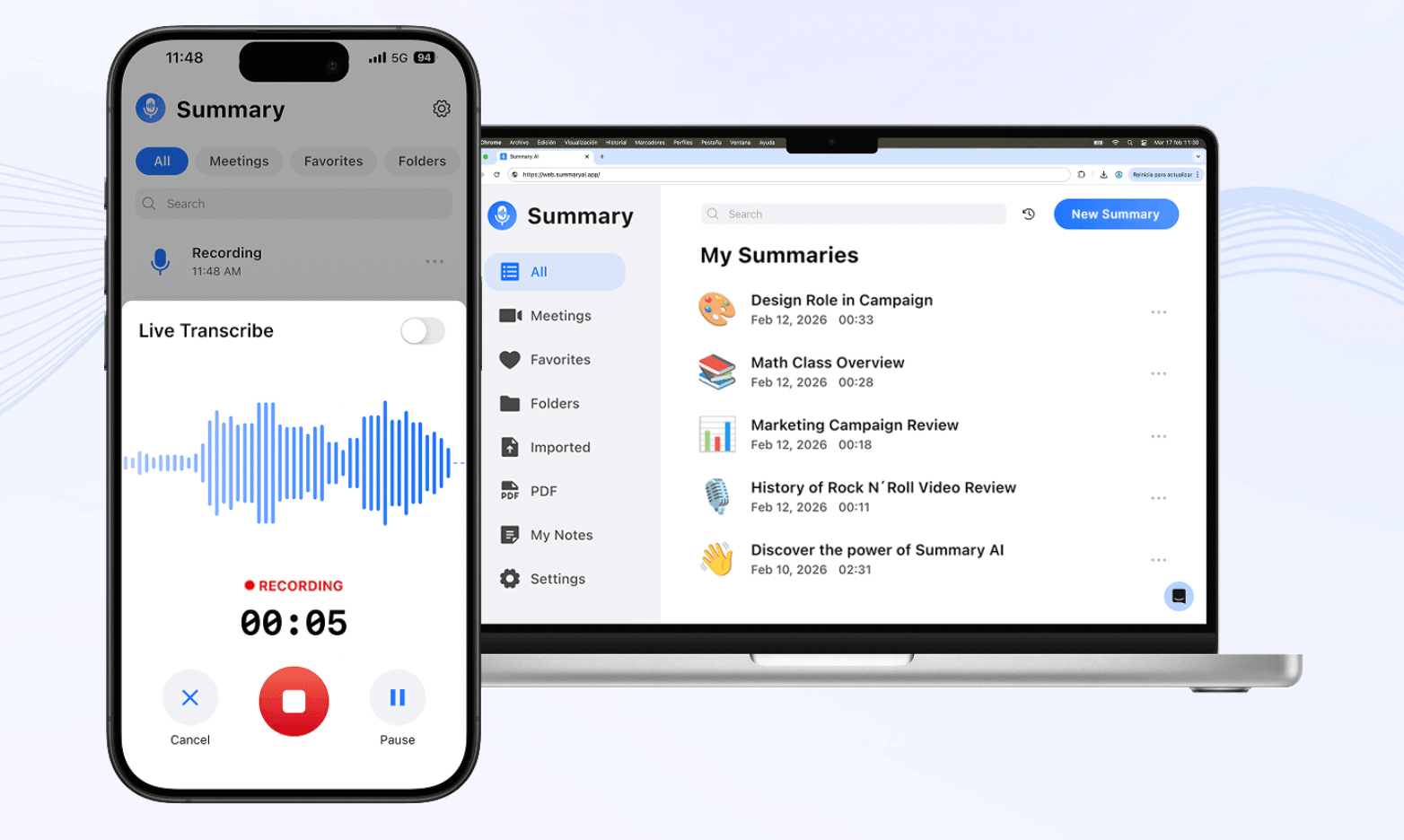
Summary AI is an AI note-taker and AI transcription platform built around software. It can join supported Zoom, Google Meet, and Microsoft Teams calls through its Meeting Assistant, or you can record interviews, lectures, calls, and in-person conversations manually.
After a conversation, Summary AI creates a searchable transcript with speaker identification and timestamps. It can also pull out decisions, action items, key points, follow-ups, and summaries, so you do not need to go through the full recording again.
Unlike PLAUD AI, Summary AI also focuses heavily on live language support. It can transcribe and translate conversations in more than 120 languages, including live translation while people are actually speaking.
Its AI Chat lets you search one or several recordings. For example, you can use it to find a decision, check what someone said, look for an action item, or return to a point from an earlier conversation.
Summary AI also supports uploaded audio and video files, plus PDF and OCR tools for scanned documents. As opposed to PLAUD AI, there is no recorder or wearable you need to purchase in order to use it.
Overall, Summary AI is mainly built for recording, transcribing, summarizing, translating, and searching conversations through software.
For more tools in this category, see our guide to the best AI note takers.
What is PLAUD AI?
Unlike Summary AI, PLAUD AI combines AI transcription software with an actual physical recording device. Plaud has several different models available, which we will also go through in this section.
Plaud Note and Note Pro are card-shaped recorders designed for phone calls and face-to-face conversations, while NotePin and NotePin S are wearable devices made for hands-free recording.
Once a conversation is recorded, PLAUD can create transcripts, summaries, action items, and other notes. Ask Plaud lets you search your recordings, while its library of more than 10,000 templates gives you different ways to format summaries.
PLAUD also has mobile, web, and desktop software, but the hardware is still a major part of the product. So, while with Summary AI you would use the phone or computer you already have, with PLAUD you have a separate device made specifically for recording. This can be a pro and a con in one.
Overall, PLAUD AI is great for people who want dedicated recording hardware combined with AI transcription and summaries.
Summary AI vs PLAUD AI: Main differences
Both tools can transcribe conversations and create AI notes, but they differ most in how the conversation is captured.
Software recording vs recording hardware
Summary AI works through phones, computers, browsers, and supported meeting platforms. You do not need to buy another device.
PLAUD AI is built around separate recorders, including card-shaped and wearable models. These give you physical controls and hands-free options, but you also have to buy, charge, and carry the hardware.
So, Summary AI is simpler if you want everything to stay on devices you already own, while PLAUD AI makes more sense if a physical recorder is something you specifically want.
Online meetings, phone calls, and hands-free recording
Summary AI can automatically send its Meeting Assistant into supported online meetings.
PLAUD AI takes a different approach. Plaud Desktop offers bot-free meeting capture, but it requires a PLAUD device linked to the account. Plaud Note and Note Pro are also designed for phone-call recording, while NotePin and NotePin S are wearables for hands-free conversations.
So, while Summary AI is better suited to automatic online meeting capture, PLAUD AI gives you more physical recording options for phone calls, interviews, and face-to-face conversations.

Languages, notes, and transcription tools
Both platforms can create searchable transcripts, summaries, and action items.
Summary AI supports more than 120 languages and includes live translation. PLAUD AI supports more than 112 transcription languages and also offers custom vocabulary for names and technical terms.
PLAUD also lists more than 10,000 summary templates, giving you more control over how notes are structured.
So, Summary AI is stronger for live multilingual conversations, while PLAUD AI gives you more control over terminology and summary formats.
Files and integrations
Both tools can process existing audio and video recordings.
Summary AI also supports PDF-to-text and OCR tools, so it can work with scanned documents as well. PLAUD is focused on recorded conversations.
PLAUD connects with Google Calendar and Zapier, while its Team plan adds Salesforce. It also has an MCP Server in beta. Summary AI only integrates with meeting platforms (Zoom, Meet, Teams) and calendars, like Google Calendar.

Summary AI vs PLAUD AI pricing
The pricing is quite different because PLAUD AI includes both hardware and software costs.
Summary AI pricing
| Plan | Price |
|---|---|
| Weekly | $8.99/week |
| Yearly | $79.99/year |
Summary AI does not require any extra hardware like Plaud. All you need is a laptop or mobile phone and your subscription, plus whatever (free) meeting platform you use.
PLAUD AI pricing
| Product or plan | Price |
|---|---|
| Plaud Note | $159 |
| Plaud Note Pro | $189 |
| Plaud NotePin | $159 |
| Plaud NotePin S | $179 |
| PLAUD Starter | $0 after device activation |
| PLAUD Pro | $17.99/month or $99.99/year |
| PLAUD Unlimited | $29.99/month or $239.99/year |
| PLAUD Team | From $20/user/month annually during current launch offer |
PLAUD Starter costs $0 after you activate a compatible device and includes 300 transcription minutes per month. Higher plans add more transcription time and features.
So, while Summary AI mainly has a software subscription cost, PLAUD AI can involve both an upfront hardware purchase and an ongoing AI plan.
When comparing the price, you should include both.

When does Summary AI make sense?
Summary AI makes more sense if you want AI notes and transcription without adding another device to your setup.
For example, you may want to automatically record online meetings, transcribe interviews, capture lectures, record in-person conversations, find action items, or translate speech in real time.
While PLAUD AI also creates transcripts and summaries, Summary AI is better suited to people who want to keep everything inside their phone, computer, browser, or meeting platform.
When does PLAUD AI make sense?
PLAUD AI makes more sense if the recording device itself matters to you.
For example, a journalist might prefer a wearable NotePin during interviews, while someone who handles many phone calls may prefer the dedicated call-recording setup of Plaud Note or Note Pro.
As opposed to Summary AI, PLAUD also gives you physical recording controls and hands-free options.
So, if you specifically want a separate recorder or wearable, PLAUD AI offers more choices.
Can Summary AI and PLAUD AI work together?
They can, although they are usually different ways of solving the same recording problem.
For example, you might use a PLAUD device to capture a conversation in a situation where carrying a laptop or using your phone is inconvenient. On the other hand, you might use Summary AI for online meetings where automatic meeting transcription and live translation are more useful.
Summary AI vs PLAUD AI: Which should you use?
Summary AI and PLAUD AI both create transcripts, summaries, and action items, but they are built around different recording setups.
Summary AI is the better fit if you want to record meetings and conversations using the devices you already own, create AI notes, and translate speech in real time.
PLAUD AI is the better fit if you want a dedicated recorder, wearable, or phone-call recording device combined with AI transcription and summaries.
In short, Summary AI is mainly a software-based meeting and transcription platform, while PLAUD AI is mainly a hardware-and-software recording system.

