





Time management tools can make it easier to stay on top of your day. They can help you plan tasks, decide what needs your attention first, schedule meetings, track your time, and avoid distractions.
Some people need a better to-do list. Others need a calendar that helps them plan out each hour of the day. If you work with a team, you may need something that shows who is working on each task and when it is due. Time management tools can help if you often reach the end of the day and wonder where all your time went.
Popular time management options include Todoist and Microsoft To Do for tasks, Trello and Asana for projects, Google Calendar for scheduling, Clockify and RescueTime for tracking time, and Forest for staying focused on your computer.
This guide looks at 12 of the best time management tools and explains what each one does well and who it may be useful for.
What are time management tools?

Time management tools are apps or software that help you organize what you need to do and make better use of the time you have.
They can help with simple things, such as writing down your daily tasks. More advanced tools can help you schedule your time, decide which tasks are most important, track how long work takes, manage projects, or block out distractions while you work.
Good time management does not mean trying to squeeze as much work as possible into every hour. That can quickly become exhausting. Instead, it is about knowing what you need to do, giving yourself enough time to do it, and changing your plan when something more important comes up.
Research has also linked better time management with stronger performance at work and school, better well-being, and lower levels of distress.
Examples of how time management tools work
Different people will use these tools in different ways.
A freelancer, for example, might use a time tracker to see how many hours are being spent on each client. This can make it easier to understand how long certain jobs really take. A manager might use a project management tool to keep track of deadlines and make sure work is moving forward.
A student may need something much simpler. A calendar and a basic task list in a productivity tool could be enough to keep track of classes, revision, assignments, and personal plans.
Ready to spend less time writing notes and more time acting on them? Try Summary AI’s AI note taker to create meeting summaries and action items automatically.
How I reviewed these tools
I chose these time management tools based on the problems they help solve, like unclear priorities, missed deadlines, scattered work, not knowing where your time goes, and everyday digital distractions.
I also looked at how easy each tool is to use, whether it has a free plan so you can try it out, and what integrations it offers so you can connect it with tools you already use. I considered mobile access, collaboration features, and whether each tool fits a different type of person and use case. Some of the tools are better for personal use, while others are best suited to students or office workers who want to manage their time better. The prices below come from each provider’s official pricing page at the time of writing. Keep in mind that these prices may change.
Top time management tools
No single tool for time management exists that will solve every time management problem you encounter.
Some of the tools below are mainly for managing tasks, whcih helps you manage your time in turn. Others are better for scheduling your day, keeping track of projects, seeing how you spend your time, or helping you stay focused.
The best choice for which time management tool to use depends on what is currently taking up too much of your time. Keep this in mind as you browse the tools available.
1. Summary AI: Make meetings more efficient with summaries
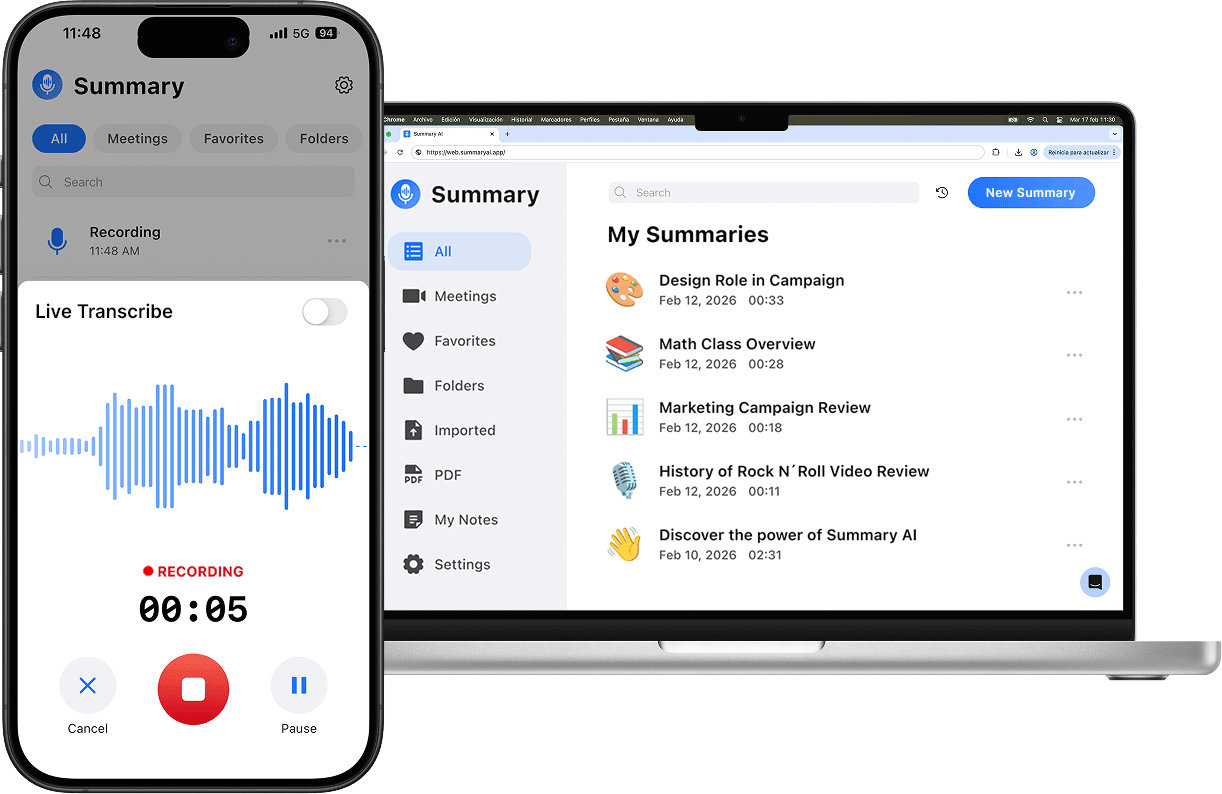
Meetings can take up a lot of your time. They can be especially time-consuming when someone also has to take meeting notes, keep track of decisions, and work out what needs to happen next. Trying to listen and write down all the key points at the same time can make it harder to give the conversation your full attention.
There is also more work after the meeting ends. Notes need to be cleaned up, action items have to be phrased correctly, and someone needs to make sure important points do not get forgotten.
Summary AI is an AI note taker designed to handle much of this work automatically.
It can record, transcribe, and make summaries of meetings, calls, and conversations. Instead of writing everything down yourself, you can go back to a written record of what was discussed and look at the main points afterward.
It can also pick out decisions, action items, and other useful details from Zoom meetings, Microsoft Teams meetings, and calls.
Best features
- AI-generated meeting summaries
- Transcription for calls and conversations
- Action items and key points
- Support for Zoom and Microsoft Teams meetings
- Searchable notes for easier follow-up
Limitations
Summary AI is most useful if meetings take up a noticeable part of your working day.
If you rarely attend meetings, you may not get as much value from it. It is really focused on meetings and conversations, so it does not replace a full project management tool or a task board.
Price
A free plan is available. If you need more features, check the Summary AI pricing page to find the best plan for your team.
2. Todoist: Task and to-do management
Todoist is a great time management tool if your main problem is keeping track of everything you need to do.
You can quickly add a task when you think of it instead of trying to remember it later. You can then give that task a due date, set a priority, or make it repeat if it is something you need to do regularly.
This makes Todoist useful for everyday life as well as work. You might use it for work deadlines, household jobs, study plans, shopping lists, or personal reminders.
It can also work for small teams that need a straightforward way to see what needs to be done.
Best features
- Entering tasks is easy
- Due dates, recurring tasks, and priorities
- List, board, and calendar layouts
- Filters and task reminders
- Email and calendar integrations
Limitations
Todoist is mainly built around tasks. That is great if you want a clear to-do list, but it may not be enough for a more complicated project involving lots of different people handling many different tasks in different areas of the company. This means that larger teams may need another project management tool alongside Todoist.
Price
Todoist has a free Beginner plan. Paid plans start at $7 per user per month.
3. Trello: Visual task and project management
Trello gives you a visual way to organize work. Instead of keeping everything in a normal list, you create boards made up of columns and cards. A simple board might have columns called “To do,” “In progress,” and “Complete.”
You can then move each card across the board as the work moves forward. This can make it much easier to see what is happening at a glance. It works well for individuals, but it can be even more useful for teams where several people are working on different parts of the same project.
Best features
- Kanban boards
- Cards with assignees and due dates
- Checklists and attachments
- Built-in automation
- Calendar, timeline, table, and dashboard views on paid plans
Limitations
Trello is easy to understand when a project is fairly simple.
Problems can start when a board becomes very large. Lots of cards, columns, deadlines, and connected tasks can make things harder to follow, especially when several projects are being managed at once.
It is also not the best choice if you need detailed reports or advanced resource planning.
Price
Trello has a free plan for up to 10 collaborators per Workspace. Paid plans start at $6 per month per user.
4. Asana: Project, task, and deadline management
Asana is a time management platform aimed more at teams than people who only want a simple personal to-do list. It helps teams break larger projects into smaller tasks. Each task can have an owner and a due date, which makes it easier to see who is responsible for doing what. This becomes useful when work is shared between different people or departments.
For example, a marketing project could involve writers, designers, managers, and other team members. Asana gives everyone one place to see the tasks, deadlines, and progress of the project. It is commonly used by people in marketing, operations, product, and client-service teams.
Best features
- Task assignments and due dates
- Project timelines and workflow views
- Team goals and reporting
- Forms and automations
- Project templates
Limitations
Asana can be more complicated than you need if all you want is a list of things to do today. It also takes some time to set up properly. Teams need to decide how projects should be organized, who owns each task, and how work will move through the system.
Going through this extra setup can be worth it for larger teams, but it may feel unnecessary for simpler planning.
Price
Asana has a free plan. Paid plans start at $13.49 per user per month.
5. Notion: Planning, tasks, notes, and productivity
Notion is more flexible than a normal time management app. You can use it to write notes, create documents, build databases, track projects, make to-do lists, and store useful information in one place. This means you can build a system that fits the way you like to work.
For example, you might use Notion as a simple weekly planner. Or you could create a much larger workspace with different projects, meeting notes, databases, calendars, and documents. That flexibility is one of the main reasons people choose Notion.
Best features
- Notes and collaborative documents
- Custom databases and templates
- Task and project trackers
- Calendar and planning views
- Centralized knowledge base
Limitations
The freedom to build almost anything can also become a problem. It is easy to spend too much time changing layouts, building databases, choosing templates, and trying to make your workspace perfect. At that point, organizing your work can start taking more time than doing the work itself. Keeping your setup simple can help avoid this.
Price
Notion has a free plan for individual users. Paid plans start at $12 per user per month.

6. Microsoft To Do: Personal task and reminder management
Microsoft To Do keeps things simple as a time management tool. You can create lists, add tasks, set due dates, and create reminders for things you do not want to forget. Recurring tasks are also useful for jobs you need to do every day, week, or month.
One of its main features is the My Day list. This gives you a place to decide what you want to get done today instead of looking at one huge list of everything you need to do. It can be especially useful if you already use Microsoft products.
Best features
- Daily planning list
- Reminders and due dates
- Recurring tasks
- Separate lists for work and personal responsibilities
- Microsoft 365 integration
Limitations
Microsoft To Do is meant to be simple, and that also means there are things it does not do. You do not get the same level of project planning, reporting, or team workflow features that you would find in tools such as Asana, for example. For personal tasks, that may not matter at all. For larger projects, it could become a problem.
Price
Microsoft To Do is free.
7. Google Calendar: Scheduling and time blocking
Summary
Most people know Google Calendar as a way to schedule meetings (through Google Meet) and appointments, but it can also be used to plan blocks of focused work. Instead of simply adding “write report” to a task list, for example, you could reserve two hours on your calendar to actually work on it. This is a time management technique known as time blocking.
You can also create new Google calendars for separate projects, set reminders, share calendars with other people, and check when colleagues are free.
Best features
- Multiple calendars
- Time blocking for focused work
- Event reminders and notifications
- Shared calendar options
- Google Meet and Gmail integration
Limitations
If you have a project with 20 small tasks, putting every single one on your calendar could quickly become messy. For that reason, Google Calendar often works better when paired with a task app such as Todoist or Microsoft To Do.
Price
Google Calendar is free with a Google account.
8. RescueTime: Automatic time tracking and productivity insights
Sometimes the problem is not knowing what you need to do. The problem is figuring out where your day actually went. RescueTime can help with that. It is a time manager that runs in the background and tracks how you spend time across different websites, apps, and projects. You can then look back at the data and get a clearer picture of how you spent your working hours.
This can be useful if you often feel busy but still struggle to get your most important work finished.
You may discover that certain websites, apps, or smaller tasks are taking up more time than you realized.
Best features
- Automatic activity tracking
- Productivity reports
- Goals and alerts
- Focus sessions
- Timesheet options for individuals and teams
Limitations
Not everyone wants an app tracking their activity in this much detail. Some people prefer to log their time themselves, especially if they only need to track a few projects or clients.
Price
Paid plans start at $9 per user per month.
9. Clockify: Time tracking and timesheets
Clockify is mainly about keeping track of hours. This makes it useful for freelancers and teams that need to know how much time is being spent on different projects or clients. You can start a timer when you begin working and stop it when you finish. If you forget, you can also enter your time manually afterward.
Over time, this gives you a record of how many hours have gone into each task. This is especially useful if you need to or want to track time by client or project for hourly billing.
Best features
- One-click timer
- Manual time entries
- Timesheets and reports
- Project and client tracking
- Billable-hour tracking
Limitations
Clockify is mainly a time tracker. It can tell you how much time you spent working on a task, but it is not designed as a complete task manager or calendar. If you need to track deadlines, organize a long list of tasks, or manage a complicated project for your entire team, you will probably need another tool as well.
Price
Clockify has a free plan. Paid plans start at $4.99 per user per month.
10. Forest: Focus and fewer distractions
Forest takes a different approach to time management. Instead of helping you organize projects or create task lists, it tries to stop you from getting distracted while you work.
You start a focus session by planting a virtual tree. The tree keeps growing while you stay focused and avoid distracting apps or websites. It is a simple idea, but the visual reward can give you a small reason to put your phone down and finish what you are working on.
Over time, your completed focus sessions create a visual record of the time you spent concentrating.
Best features
- Pomodoro-style focus timer
- Gamified focus sessions
- Visual record of focused work
- Encourages phone-free time
- Simple, low-pressure design
Limitations
Forest can help you focus, but you still need to choose what you are going to work on before starting a session. For that reason, Forest works as a focus tool alongside a task manager or calendar rather than as a complete time management system.
Price
Forest has a free version.
11. TickTick: Tasks, habits, calendar, and reminders
TickTick puts several time management features into one app. You can create tasks, set reminders, view your schedule on a calendar, track habits, and use a Pomodoro timer when you want to focus.
Best features
- Tasks and recurring reminders
- Calendar views
- Habit tracking
- Pomodoro timer
- Lists, tags, and priorities
Limitations
Having lots of features in one app is useful for some people. For others, it can make the app feel like too much to learn. If you only want a place to write down a few tasks, you may not need all of the extra tools.
Price
TickTick has a free plan. Premium plans start at $35.99 per year.
12. monday.com: Project and workflow management
monday.com is a task and time management platform (and som much more) made for managing work across teams.
It uses visual boards to show projects, tasks, deadlines, and workflows. Team members can see what others are working on, who is responsible for each task, and how work is progressing. This is useful when a project involves several people.
It is especially useful for businesses that need to coordinate work between different people, teams, or departments.
Best features
- Customizable boards
- Workflow automations
- Project views and dashboards
- Team collaboration
- Templates for operational processes
Limitations
monday.com can be more than you need if you are only trying to organize your own day.
Its extra features make more sense when several people are using the same system.
Cost is another thing to consider. The price can increase as you add more team members and start using more advanced features.
Price
monday.com has a free plan. Paid plans start at $12 per user per month.
How to choose time management tools
Start by looking at your day and noticing where things tend to break down. Sometimes the issue is simple. You forget tasks you should be doing. Other times, your calendar is packed but nothing important actually gets done. And in many cases, you know what you should be working on, but it is hard to stay focused long enough to finish it.
Once you understand the real problem, choosing a tool for time management becomes much easier.
The key is not to use more apps, but to fix the specific issue in your workflow. Different tools solve different problems.
- A task list app helps when your brain feels cluttered and you keep forgetting things
- A calendar helps when your time keeps disappearing into meetings and random work
- A focus tool helps when distractions keep pulling you away from what you planned to do
- A time tracking tool helps when you are not sure where your hours are actually going
You can also use simple frameworks to guide how you manage your time. The Eisenhower Matrix is a good example. It helps you sort tasks into what is urgent, what is important, and what can wait or be removed entirely. It is not complicated, but it can quickly show you what deserves attention first.
The most important thing is to keep your system simple enough that you will actually use it. If a setup takes too long to maintain, it usually stops working after a while. This is especially true for people who prefer structure but struggle with consistency, including many people with ADHD.
In those cases, simpler systems often work better. For example:
- Clear visual layouts that show what needs attention at a glance
- Reminders that nudge you without overwhelming you
- Short focus sessions that are easier to start and finish
Keep in mind that the goal is finding a time management framework you can return to every day without too much effort.
Save time with Summary AI
For many people, meetings are one of the biggest time drains. They take attention, create notes, and often lead to extra follow-up work that is easy to lose track of.
This is where Summary AI can make a real difference with its AI Note Taker. It captures meetings automatically, turns conversations into clear summaries, and highlights action items so you don’t miss anything. Instead of splitting your attention between listening and writing, you can stay present in the discussion and let the tool handle the note-taking. After the meeting, everything is already organized and ready to use.

