



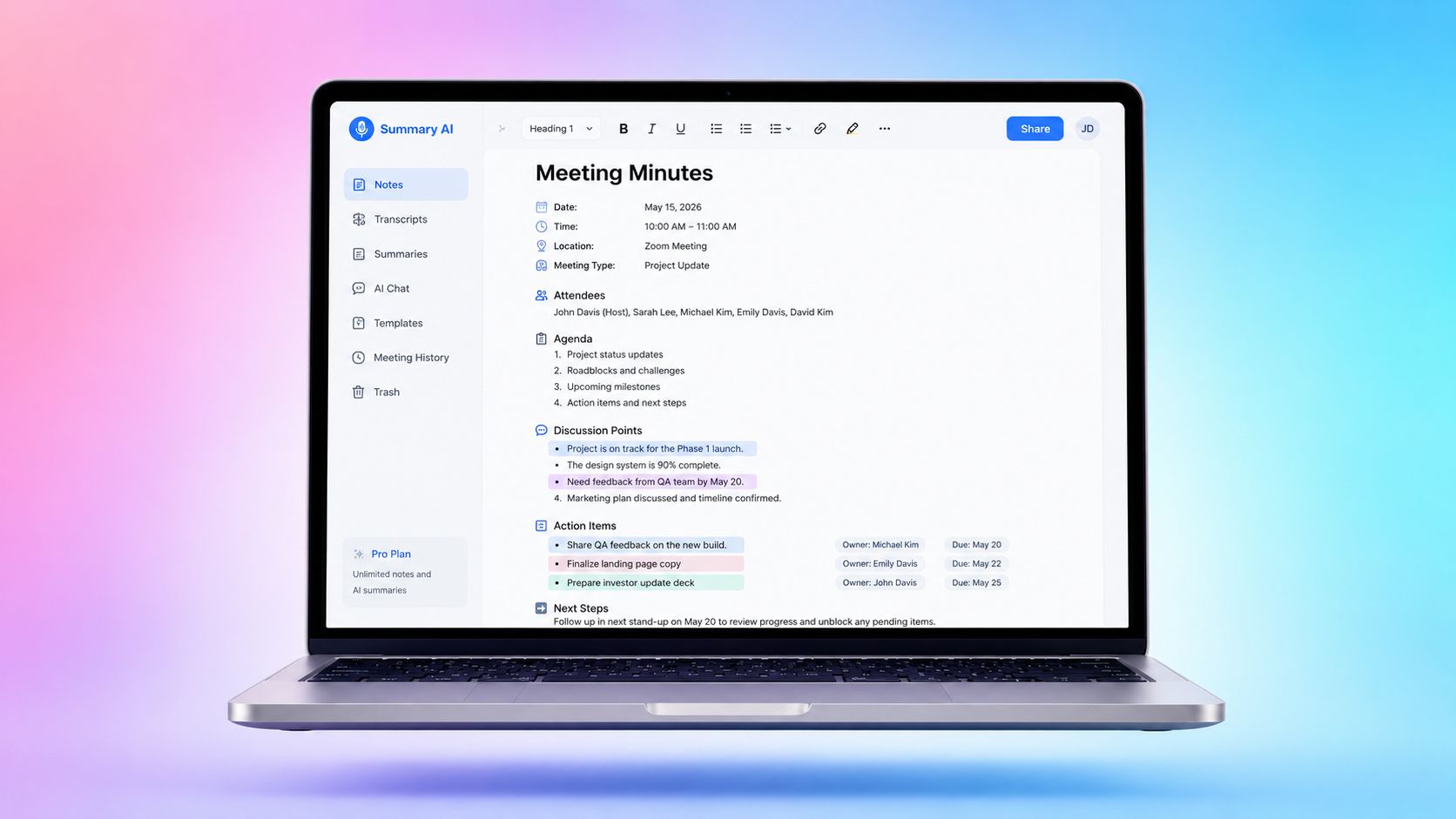




Learning how to write meeting minutes is a useful skill for any workplace. Good minutes help people remember what was discussed, what was decided, and what needs to happen next.
Meeting minutes do not need to be long or hard to read. In fact, the best ones are clear, simple, and easy to scan. They give people the key facts without turning the meeting into a full transcript.
In this guide, you’ll learn how to write meeting minutes before, during, and after a meeting. You’ll also see what to include, what to skip, and how to make your minutes more useful for your team.
What Meeting Minutes Are

Meeting minutes are the written record of a meeting. They show what happened, who was there, what decisions were made, and what tasks need to be done after the meeting. They are often used in team meetings, board meetings, client calls, project updates, and nonprofit meetings.
Some meetings (like board meetings, for example) need formal minutes for legal or record-keeping reasons. Others use minutes to help the team stay organized.
Here’s a list of what most meeting minutes include:
- Meeting title
- Date and time
- Location or meeting link
- Names of attendees
- Names of people who were absent
- Agenda items
- Key points
- Decisions made
- Action items
- Task owners
- Deadlines
- Next meeting details, if needed
When you write meeting minutes, your goal is not to capture every word. Your goal is to record the most important outcomes. For example, you do not need to write down every comment from a long discussion. You only need to capture the main topic, the final decision, and any next steps.
An AI note taker like Summary AI can make meeting minutes for you by joining your call, recording and transcribing everything, then creating the perfect summary with speaker labels and action items that you can share with your colleagues.
What Not to Do When Taking Meeting Minutes
Taking good meeting minutes is not only about knowing what to write down. It is also about knowing what to leave out.
Here are common mistakes to avoid:
- Do not write a full transcript. Meeting minutes should not include every sentence people say. A transcript is too long and hard to use.
- Do not include personal opinions. Minutes should be neutral and factual. Avoid writing things like “the team was unhappy” or “this was a bad idea.”
- Do not include side conversations. If people talk about something that is not part of the meeting, leave it out.
- Do not record jokes or casual comments. Minutes should focus on meeting business.
- Do not guess. If you are not sure who owns a task or what deadline was agreed on, ask for clarification during the meeting.
- Do not wait too long to clean up your notes. It is much easier to finish the minutes while the meeting is still fresh in your mind.
Here is a simple example of good vs. bad meeting minutes:
| Weak version: | Better version: |
| “The team talked for a long time about the launch plan, and some people seemed unsure.” | “The team reviewed the launch plan. No final decision was made. The launch timeline will be discussed again on Friday.” |
The second version is better because it is clear, neutral, and the information it contains is actually useful for someone reviewing what was discussed at the meeting.
Meeting Minutes vs. Meeting Notes
Meeting minutes and meeting notes are similar, but they are not the same.
- Meeting notes are usually informal. They may be for your own use. They can include rough ideas, reminders, questions, or extra details that help you remember the meeting.
- Meeting minutes are more structured. They are often shared with other people. They focus on decisions, action items, and official records.
If you are writing meeting minutes for a formal meeting, keep the tone clear and professional. Do not add personal thoughts or extra details that do not affect the outcome.
How to Prepare Before Taking Minutes
The key to taking meeting minutes is to start preparing before the meeting begins. When you prepare in advance, it is easier to follow the conversation and notice what matters.
The more you prepare, the easier it is to write meeting minutes that are clear and complete.
1. Review the Agenda
The agenda is your guide for the meeting. It tells you what topics will be discussed and in what order. Knowing the agenda will help you keep up with the topics and make your minutes more organized.
Before the meeting, read the agenda carefully. Use each agenda item as a section in your minutes. This helps you organize your notes as the meeting happens.
For each agenda item, leave space to record:
- Main discussion points
- Decisions
- Action items
- Owners
- Deadlines
If the meeting does not have an agenda, ask the meeting organizer for one. Even a short list of topics can make writing meeting minutes much easier.
2. Familiarize Yourself with the Material
Before the meeting, review any documents, reports, slides, or previous minutes that will be discussed. This helps you understand the topic before people start talking. It also helps you follow names, numbers, deadlines, and project details.
For example, if the team is reviewing a budget, look at the budget file before the meeting. If the team is discussing a project update, go through the notes of the project in the project management platform you use and read the last updates before the meeting.
You do not need to memorize everything. The goal is to understand enough so you can follow the meeting and write accurate minutes. If you familiarize yourself with the material, not everything will be completely new to you and you can decide more easily what is important to record and what can be left out.
3. Know the Participants
It is important to know who is attending the meeting. This helps you record who said they would do something and who is responsible for each task.
Before the meeting, check:
- Who will attend
- Who is leading the meeting
- Who is taking the minutes
- Who can approve decisions
- Who is responsible for follow-up work
Also check the spelling of names. This is especially important for formal meeting minutes. If you are unsure who someone is during the meeting, ask politely or check the meeting invite.

4. Use a Meeting Minutes Template
A template for meeting minutes makes writing minutes faster and easier. It also helps you keep the same structure every time.
A simple meeting minutes template can include:
- Meeting title:
- Date and time:
- Location or meeting link:
- Meeting lead:
- Minute-taker:
- Attendees:
- Absentees:
- Agenda item 1:
- Discussion summary:
- Decision:
- Action items:
- Agenda item 2:
- Discussion summary:
- Decision:
- Action items:
- Next meeting:
Using a meeting minutes template like this also helps you avoid missing important details. You can fill in basic information before the meeting starts, then add notes as the meeting moves forward.
How to Take Meeting Minutes in Real Time

When the meeting starts, your job is to listen for the most important information. Do not try to write down everything.
- When writing meeting minutes in real time, focus on:
- What topic is being discussed
- What decision was made
- What action needs to happen
- Who owns the action
- When it is due
Use short notes during the meeting. You can turn them into full sentences later.
For example, during the meeting you might write:
“Website launch delayed. New date: May 15. Alex to update client by Friday.”
After the meeting, you can polish it into:
“The team agreed to move the website launch date to May 15. Alex will update the client by Friday.”
Add Meeting Details and Participants
Start by recording the basic meeting details. These details help people find and understand the minutes later.
Include these details:
- Meeting name
- Date
- Start time
- End time, if needed
- Location or video call platform
- Meeting lead
- Minute-taker
- Attendees
- Absentees
- Guests
For virtual meetings, you can write the platform name, such as Zoom, Google Meet, or Microsoft Teams. If someone joins late or leaves early, only include that detail if it matters for the record.
What to Capture for Each Agenda Item
For each agenda item, write a short summary of the discussion. Keep it simple and focus on the outcome.
You should capture:
- The topic
- The main points discussed
- Any decision made
- Any decision that was delayed
- Any vote or approval, if needed
- Any follow-up task
- Any document or report that was reviewed
Here is a simple example of what meeting minutes will contain:
- Agenda item: Website redesign
- Discussion summary: The team reviewed two design options and compared cost, timeline, and user experience.
- Decision: The team approved Option B.
- Action item: Marketing will prepare the updated website copy by Friday.
This format is easy to read because each part has a clear purpose.
If no decision was made, say that clearly.
For example:
“No final decision was made. The team will review the budget again next week.”
This helps avoid confusion after the meeting.

Recording Action Items
Action items are one of the most important parts of meeting minutes. They show what needs to happen after the meeting.
Each action item should include three things:
- The task
- The owner
- The deadline
A strong action item is clear and specific.
| Weak version: | Better version: |
| “Follow up with client.” | “Send the revised proposal to the client. Owner: Jamie. Due: Thursday.” |
Here are more examples:
- “Prepare the Q2 sales report. Owner: Maria. Due: March 20.”
- “Schedule the next planning meeting. Owner: David. Due: Friday.”
- “Review customer feedback and share key issues with the product team. Owner: Priya. Due: Next Wednesday.”
If an action item does not have an owner or deadline, ask during the meeting. It is better to ask right away than to guess later.
You can say:
“Who should own this task?”
Or:
“What deadline should I add for this action item?”
This small step seems really simple but it makes the minutes much more useful.
How To Polish Minutes After the Meeting
After the meeting, review your notes as soon as you can. Your rough notes may make sense to you during the meeting, but they may be unclear later.
To polish your minutes, follow these steps.
- First, organize your notes under the right agenda items. Make sure each topic is in the correct section.
- Second, rewrite rough notes into clear sentences. Keep the wording simple.
- Third, remove extra details. If a comment does not affect the decision or next step, you probably do not need it.
- Fourth, check names, dates, numbers, and deadlines. These details need to be accurate.
- Fifth, review all action items. Make sure each one has a task, owner, and due date.
- Sixth, send the minutes for review if your team requires it. Some meetings, especially board meetings, may need approval before the minutes become official.
- Finally, share the final version with the right people. Store the minutes in a place where the team can find them later.
To write meeting minutes well, do not stop at taking notes. The review step is what turns rough notes into a clear record.
Best Practices for Effective Meeting Minutes
The best meeting minutes are clear, useful, and easy to act on. They do not need fancy language or long paragraphs.
Here are some best practices to follow.
- Use simple language. Write in a way that anyone on the team can understand.
- Stay neutral. Do not include opinions, emotions, or personal comments.
- Follow the agenda order. This makes the minutes easier to scan.
- Focus on outcomes. Record what was decided and what happens next.
- Use action verbs. Start action items with words like send, review, prepare, update, schedule, or confirm.
- Keep summaries short. A few clear sentences are often enough.
- Mark unclear items. If something needs to be confirmed, highlight it and follow up.
- Share minutes quickly. The sooner people receive the minutes, the easier it is for them to act.
- Use the same format every time. A consistent structure helps people find information faster.
- Store minutes in one place. Use a shared folder, project tool, or meeting workspace.
- Review past action items. At the next meeting, check what was completed and what still needs attention.
You can also use tools to make the process easier. For example, an AI note taking app can help create a first draft from a meeting transcript or recording. This can save time, especially for long meetings. Still, a person should review the final version. Good minutes need human judgment. You need to make sure the decisions, action items, names, and deadlines are correct. A tool like Summary AI can do most of the work for you, however.
Create perfect meeting minutes with Summary AI
Learning how to write meeting minutes is mostly about focusing on what matters: decisions, action items, owners, and deadlines. With a clear process, you can write meeting minutes that help your team stay aligned and move work forward. Summary AI can automate the process for you so you never miss a thing and you can focus on participating in the meeting instead. Summary AI is an AI note taker that you can use to turn meetings into clear summaries with speaker labels and action items that are easier to review and share.

