





Comparison between two AI tools built for different types of work is not easy, but we will break it down for you in this guide to two popular platforms: Summary AI vs NoteGPT.
Summary AI is made for recording and transcribing meetings and conversations. It can create searchable transcripts, AI summaries, action items, and live translations in more than 120 languages. You can use it for online meetings, interviews, lectures, calls, and in-person conversations.
NoteGPT is made more for working with content you already have. You can give it YouTube videos, PDFs, webpages, documents, audio, video, presentations, and other material. It can then summarize that content, answer questions about it, and turn it into flashcards, quizzes, mind maps, podcasts, and presentations.
There is some overlap because both tools can transcribe, summarize, and answer questions about information.
However, their main jobs are different. Summary AI is mainly a meeting transcription and AI note-taking platform. NoteGPT is mainly a content summarization, research, and study tool.
Key Facts
- Summary AI focuses on meetings, transcription, AI summaries, action items, and live translation.
- NoteGPT focuses on YouTube, documents, webpages, research, and study material.
- Summary AI can automatically join supported online meetings.
- NoteGPT is more focused on content that you upload or provide.
- Summary AI supports transcription and live translation in more than 120 languages.
- NoteGPT supports voice transcription in more than 100 languages and dialects.
- Summary AI costs $8.99 per week or $79.99 per year.
- NoteGPT has free tools with limits, while paid plans start at $9.99 per month.
Where Summary AI and NoteGPT fit
The easiest way to understand the two platforms is to look at what each one is mainly designed to do.
| Platform | Main purpose | Typical use |
|---|---|---|
| Summary AI | Meeting recording, transcription, AI notes, action items, and translation | Record a meeting, interview, lecture, or conversation and turn it into searchable notes |
| NoteGPT | Content summarization, research, and study tools | Add YouTube videos, documents, webpages, or files and turn them into summaries and learning material |
Summary AI is useful when you need to capture and understand a conversation. NoteGPT is useful when you already have content that you want to summarize, research, or turn into another format.
What is Summary AI?
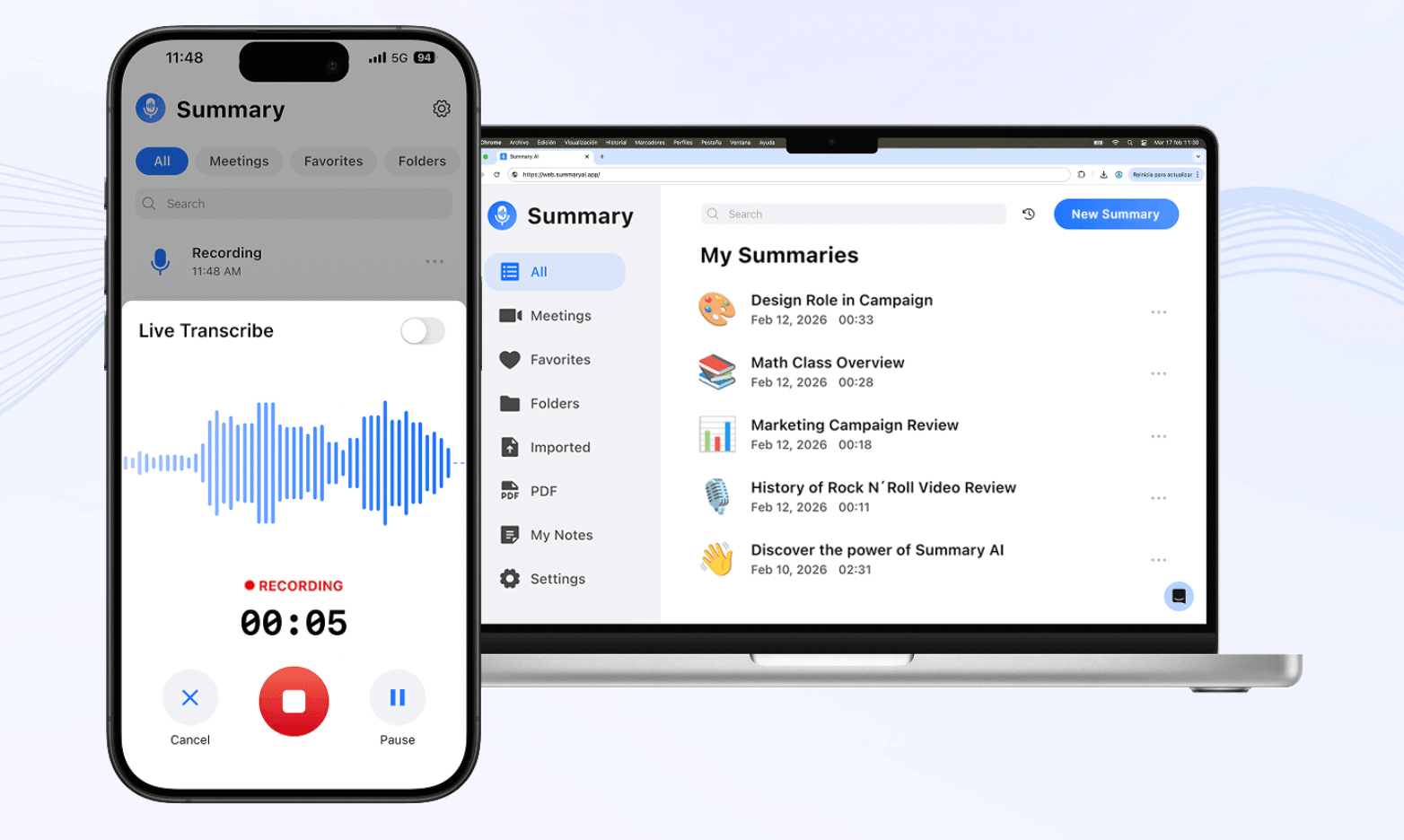
Summary AI is an AI meeting and transcription platform. Its main features are designed around recording spoken conversations and turning them into useful information.
Meeting and conversation recording
Summary AI can capture online and in-person conversations. Its Meeting Assistant can join supported Zoom, Google Meet, and Microsoft Teams calls.
You can also record manually from your phone or browser.
This makes it useful for:
- Team meetings
- Client calls
- Interviews
- Lectures
- Phone calls
- In-person discussions
Transcription and AI summaries
Summary AI creates a searchable transcript with speaker identification and timestamps.
It can also automatically find:
- Key points
- Decisions
- Action items
- Follow-ups
- Meeting summaries
This lets you review the important information without going back through the full recording.
Live translation
Summary AI supports transcription and translation in more than 120 languages. It can also translate conversations while people are speaking. This makes it useful for international meetings, multilingual interviews, lectures, and calls.
AI Chat
AI Chat lets you ask questions about one or several recordings. For example, you can use it to find:
- A decision from a meeting
- Something a client said
- A task assigned during a call
- A point mentioned in a lecture
- Information across several recordings
Audio, video, PDFs, and OCR
Summary AI also supports uploaded audio and video files. Its PDF and OCR tools can extract searchable text from PDFs and scanned documents.
Overall, Summary AI is mainly designed for recording, transcribing, summarizing, translating, and searching conversations.
For more tools in this category, see our guide to the best AI note-taking apps.
What is NoteGPT?
NoteGPT is an AI content, research, and learning platform. Its features are built around taking information that already exists and turning it into shorter, more useful, or easier-to-study formats.
YouTube summaries
YouTube summaries are one of NoteGPT’s main workflows. You can use it to create transcripts and summaries from YouTube videos. On applicable plans, it can also work with playlists, batch processing, and channel content.
This can be useful for:
- Online lectures
- Tutorials
- Interviews
- Podcasts
- Educational videos
- Research videos
Documents and webpages
NoteGPT also works with many other content types.
These include:
- PDFs
- Webpages
- Word documents
- PowerPoint files
- eBooks
- Audio
- Video
- Other supported files
You can use AI to summarize and ask questions about the material.
Voice transcription
NoteGPT includes voice-to-text tools for audio and video. This gives it a transcription workflow, but it is more focused on processing existing content than automatically joining meetings.
Flashcards and quizzes
NoteGPT can turn source material into flashcards and quizzes. This can help if you want to study information rather than simply summarize it.
Mind maps, podcasts, and presentations
NoteGPT can also transform content into:
- Mind maps
- AI podcasts
- Presentations
- Other review and learning formats
This makes it useful when you want to reuse the same source in several different ways. Overall, NoteGPT is mainly designed for summarizing, studying, researching, and repurposing existing content.
Summary AI vs NoteGPT: Main differences
Summary AI and NoteGPT overlap around transcription, summaries, and AI chat. However, they are built around very different workflows.
Summary AI focuses on meetings and conversations. NoteGPT focuses on existing content such as YouTube videos, documents, webpages, and files.
Live meetings vs existing content
Summary AI can capture conversations while they happen. Its Meeting Assistant can automatically join supported Zoom, Google Meet, and Microsoft Teams calls. You can also manually record interviews, lectures, calls, and in-person conversations.
NoteGPT works more with information you already have. You normally give it a video, audio file, webpage, document, or another source and then use its AI tools to process the material.
So, Summary AI is designed to work during and after a conversation. NoteGPT is designed more for processing content that already exists.

Meeting transcription vs content transcription
Both platforms can transcribe audio and video. Summary AI’s transcription workflow is built around conversations. It includes speaker identification, timestamps, AI summaries, action items, and live translation.
NoteGPT’s transcription tools are part of a wider content-processing platform. You might transcribe an audio file and then turn it into a summary, quiz, mind map, or presentation.
So, Summary AI is more focused on understanding what happened in a conversation. NoteGPT is more focused on using the transcript as another piece of content you can transform.
Live translation vs translation tools
Summary AI supports transcription and translation in more than 120 languages. It also supports live translation while people are speaking.
NoteGPT has translation tools and supports more than 100 languages and dialects through its voice-to-text features.
However, its workflow is not centered on translating live meetings. This makes Summary AI more suitable when translation is needed during a conversation. NoteGPT is more suited to translating or processing content you already have.
YouTube, webpages, and documents
NoteGPT has a much broader workflow for online and written content.
It can work with:
- YouTube videos
- YouTube playlists
- Webpages
- PDFs
- PowerPoint files
- Word documents
- eBooks
- Audio
- Video
Summary AI supports uploaded audio, video, PDFs, and OCR for scanned documents. However, it does not have the same YouTube, webpage, and multi-format research workflow.
So, NoteGPT is more useful when most of your information comes from online videos, websites, and documents. Summary AI stays more focused on conversations and recordings.
AI Chat for conversations vs AI Chat for content
Both platforms let you ask AI questions. Summary AI’s AI Chat is designed around meetings and recordings.
You might use it to:
- Find a decision
- Check what someone said
- Find an action item
- Search several meetings
- Return to part of a lecture
NoteGPT’s AI tools are designed more around the content you provide.
You might use them to:
- Ask questions about a PDF
- Understand a YouTube lecture
- Summarize a webpage
- Compare parts of a document
- Review study material
So, Summary AI’s AI Chat is more focused on searching conversations, while NoteGPT is more focused on understanding existing content.
Study and content-generation tools
This is one of the biggest differences.
NoteGPT can turn source material into:
- Flashcards
- Quizzes
- Mind maps
- AI podcasts
- Presentations
Summary AI does not provide the same study and content-generation workflow.
Its main output stays focused on:
- Transcripts
- Summaries
- Action items
- Decisions
- Follow-ups
- Translations
- Searchable meeting information
This makes NoteGPT more useful when you want to turn existing information into new learning or presentation formats. Summary AI is more useful when you need to transcribe and summarize a conversation accurately.

Summary AI vs NoteGPT pricing
Summary AI pricing
| Plan | Price |
|---|---|
| Weekly | $8.99/week |
| Yearly | $79.99/year |
Summary AI’s subscription is mainly for its meeting recording, transcription, AI notes, translation, and related conversation features.
NoteGPT pricing
| Plan | Price |
|---|---|
| Free | Ongoing free tools with limits |
| Pro | $9.99/month or $108/year |
| Unlimited | $29/month or $239/year |
| Max | $99/month or $829/year |
NoteGPT uses Basic Quotas for common tasks such as transcription, summaries, translation, and mind maps. It also uses Premium Credits for more expensive AI features.
This means the amount you can use NoteGPT depends on the quotas and credits included with your plan. Summary AI has a simpler subscription structure. NoteGPT has more plan levels because it includes a broader range of AI content tools.

When to choose Summary AI vs NoteGPT
Summary AI makes sense when conversations are the information you need to capture.
For example, you may want to:
- Automatically record meetings
- Create searchable transcripts
- Generate AI meeting summaries
- Find action items and decisions
- Record interviews
- Capture lectures
- Record in-person conversations
- Translate speech in real time
- Search previous meetings
- Work across many spoken languages
Its main job is to make spoken conversations easier to capture, understand, search, and review.
When to choose NoteGPT vs Summary AI
NoteGPT makes sense when you already have information and want AI to help you process or reuse it.
For example, you may want to:
- Summarize YouTube videos
- Process YouTube playlists
- Summarize webpages
- Work with PDFs
- Summarize Word or PowerPoint files
- Transcribe uploaded audio or video
- Create flashcards
- Generate quizzes
- Build mind maps
- Create AI podcasts
- Generate presentations
- Turn research into different formats
Its main job is to help you summarize, research, study, and repurpose existing content.
Using Summary AI and NoteGPT together
The two platforms focus on different parts of your workflow, which means they can also complement each other.
For example, you could use Summary AI to record and transcribe a live interview. Summary AI could create the transcript, summary, action items, and translation. You could then use the resulting material as part of a wider content, research, or study workflow.
The same idea could apply to lectures, research interviews, or other conversations. Summary AI would handle the live conversation and transcription, while NoteGPT could help with reusing or transforming the resulting content.
Summary AI vs NoteGPT: Which should you use?
As you see from this comparison article, Summary AI and NoteGPT are built for different types of work.
Summary AI is the more relevant tool if you need to record meetings or conversations, create searchable transcripts and AI summaries, find action items, or translate speech in real time.
NoteGPT is the more relevant tool if you already have YouTube videos, documents, webpages, audio, video, or research material and want to summarize, study, or transform that content.
Summary AI is mainly a meeting transcription and AI note-taker. NoteGPT is mainly a content summarization, research, and study platform.

