



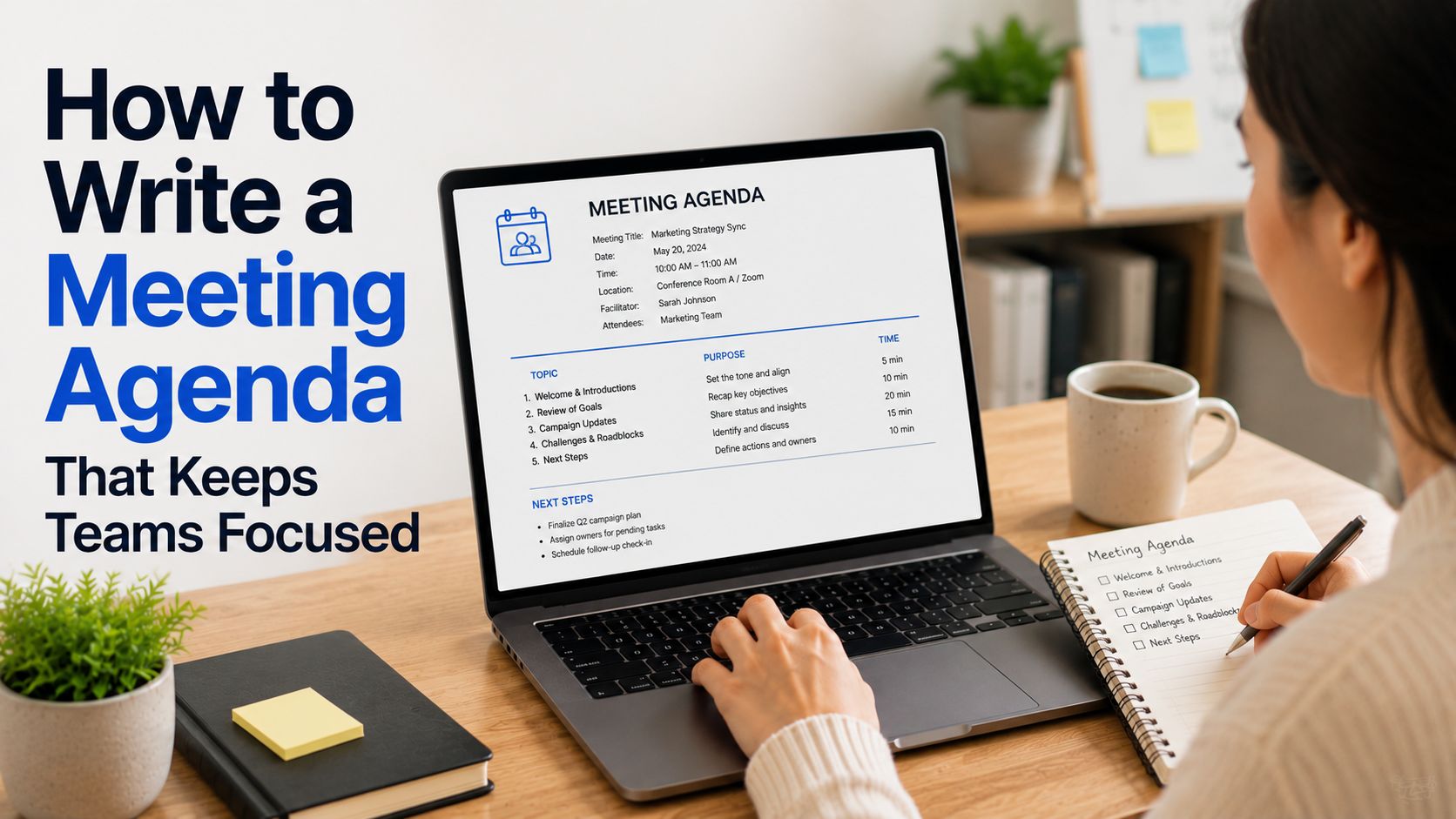




A meeting agenda is a simple plan for a meeting. It tells everyone why they are meeting, what they will talk about, who will lead each topic, and how long each part should take. Learning how to write a meeting agenda can help your team stay focused, make decisions faster, and leave the meeting with a clear idea of the next steps they need to take.
This guide explains how to write an agenda for a meeting, what to include, and how to use the agenda before, during, and after the call.
What Is a Meeting Agenda?

A meeting agenda is a written outline of the topics a group will cover during a meeting. It gives the meeting a clear structure and helps attendees prepare.
A good meeting agenda should include the date and place, or the video call link for remote meetings. It should also explain the meeting goal, list the main topics, and show how much time each topic needs.
You can use a meeting agenda for almost any type of meeting, including team meetings, one-on-one meetings, and board meetings.
The way you actually share the meeting agenda with others can be a simple list in an email attached to the meeting invite, for example. Google Meets lets you add attachments to meeting invites, which can be a great way to share the agenda with participants.
Taking meeting notes is important, but sometimes it can distract you from what is being discussed in the call. An AI Note Taker like Summary AI can join your call, transcribe everything with speaker labels, and make a summary for you with all of the key points highlighted.
Elements to Include in a Meeting Agenda
How should a meeting agenda look? It doesn’t need to be fancy. It just needs to give people the information they need to prepare and take part in the meeting.
Here are the main parts of a good meeting agenda.
Meeting Title
Start with a clear title. Avoid vague titles such as “Team Meeting” or “Catch-Up” when you can. Instead, use a title that explains the main purpose.
Use descriptive titles like this:
- Q3 Marketing Planning Meeting
- Website Redesign Kickoff
- Monthly Sales Review
- New Client Onboarding Call
- Board Budget Approval Meeting
A clear title helps people know why they are being invited.
Date, Time, and Location
A meeting agenda should include the date and place. Add the start time, end time, time zone, and location.
For an online meeting, include the Microsoft Teams, Zoom, or Google Meet link. If your team works across time zones, write the time zone clearly so no one joins at the wrong time.
For example:
- Date: Tuesday, June 10
- Time: 2:00–2:45 p.m. ET
- Location: Microsoft Teams
- Meeting link: [Add link]
- Attendees
List the people who need to attend. If some people only need to join for one topic, make that clear.
You can also separate attendees into groups, if necessary:
- Required attendees
- Optional attendees
- Presenter or meeting lead
Meeting Goal
The meeting goal explains what the group should strive to achieve in the call. It should be specific and easy to understand.
For example, instead of writing:
Discuss social media.
Write:
Review and approve the Q3 social media plan.
The second version is clearer because it tells people the exact outcome the meeting needs to end with. The goal of the meeting is fixed.
A good meeting agenda often starts with one sentence like this:
Goal: Agree on the product launch timeline, assign owners, and confirm next steps.
Pre-Reading and Materials
If people need to read a report, review a spreadsheet, or look at a draft before the meeting, add links to those materials in the agenda.
This helps the group spend meeting time on discussion and decisions instead of reading documents together.
This can also inlude previous meeting notes.
Give people enough time to read these items. Try to send the agenda and materials at least 24 to 48 hours before the meeting.
Agenda Topics
The main part of an agenda is the list of topics. Put the most important topics near the beginning, when people have more energy and time.
For each topic, include:
- The topic or question
- The purpose
- The person leading it
- The time allowed
- The expected outcome
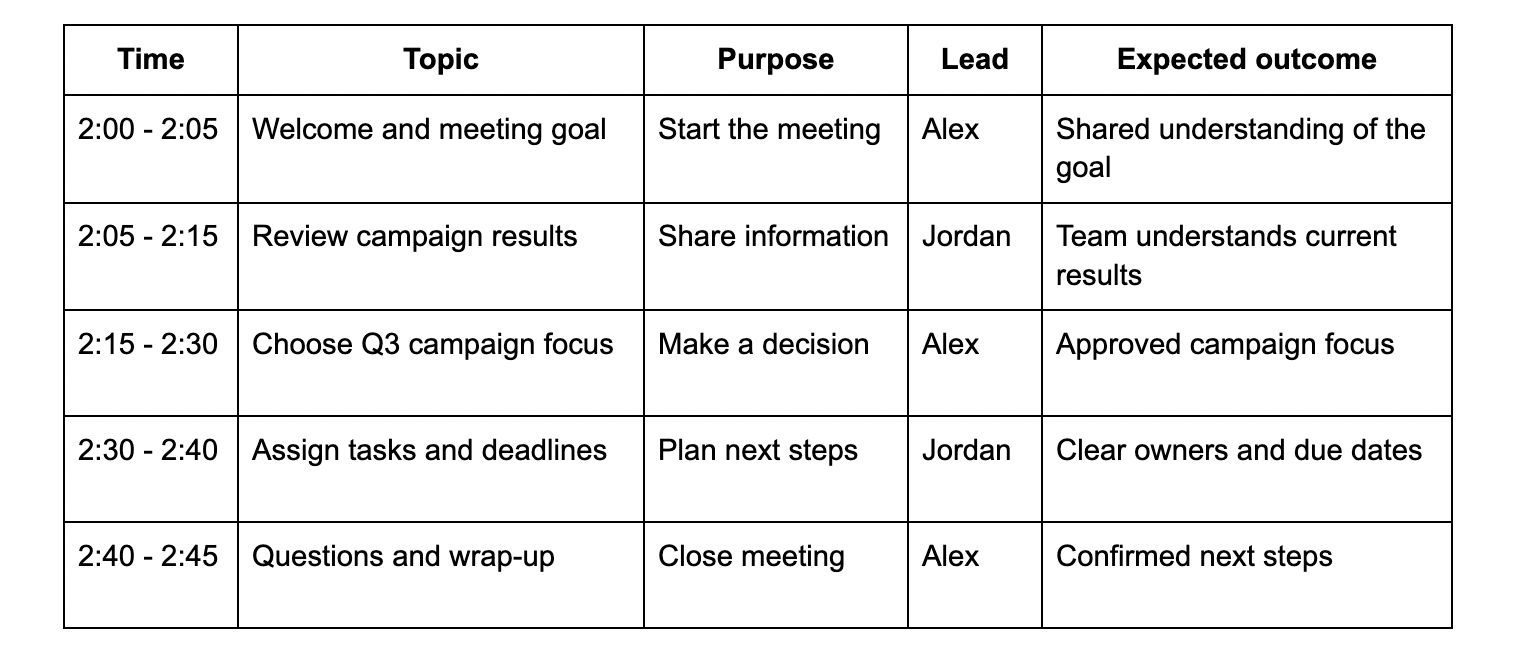
For example, meeting agenda topics may look like this:
Action Items and Next Steps
Leave a few minutes at the end for action items. Write down what needs to happen, who owns each task, and when it is due.
For example:
- Anna will update the campaign brief by Friday
- Brad will share the revised budget by June 14
- Claire will book the client review meeting for next week
This part is important because meetings should ultimately lead to taking some sort of action. Without having clear next steps, people may leave with different ideas about what they need to do and following up will also be more difficult.
When to Use a Meeting Agenda
Most meetings should have an agenda.
An agenda helps people stay focused, make decisions, solve problems, share updates, and plan next steps. Even short, 15-minute meetings can benefit from a simple agenda.
If you have recurring meetings, use the same agenda format each time. This helps everyone know what to expect and makes it easier to track decisions and follow up on action items.
How to Write a Meeting Agenda

You can learn how to write agendas for meeting planning in a few simple steps. Start with the goal, then build the agenda around what the group needs to do.
1. Decide Whether You Need the Meeting
First of all, before you write an agenda, ask whether a meeting is actually necessary.
Some updates can happen async in an email or on Slack or through a productivity tool like Notion. A meeting is useful when people need to make a decision together, solve a problem, plan work, or discuss something that needs live input.
If you cannot explain why the meeting is needed, you may not need to schedule it.
2. Set One Clear Goal
Next, write one clear goal for the meeting. This is the most important step in writing a meeting agenda.
An unclear goal might be:
Discuss the new website.
Rephrasing the goal in a better way:
Choose the top three website pages to update before the product launch.
The second version gives the group a clear outcome. Everyone knows what the meeting needs to achieve and includes something to follow up on as well.
3. Choose the Right Attendees
Invite only the people who need to take part. Too many attendees can slow down a meeting. Too few attendees can mean that key decisions have to wait.
If someone only needs an update, send them the meeting notes afterward instead of inviting them.
4. List the Topics
Write down the topics you need to cover to reach the goal of the meeting. Put them in a logical order.
Start with a short welcome and the meeting goal. Then cover the biggest decisions or most important questions. Leave updates and smaller items for later.
Try to frame agenda items as questions. Questions push the group toward a decision or useful discussion.
For example, instead of just writing:
Product launch
Think about:
What needs to happen before the product launch date?
Instead of just writing:
Budget
Write something like:
Should we approve the proposed Q3 budget?
Writing topics in this way makes it clear what the group needs to discuss.
5. Add a Purpose for Each Topic
Every agenda item should have a purpose. A topic may be there to share information, gather ideas, ask for feedback, solve a problem, or make a decision.
Use simple labels such as:
- Info: Share an update
- Discussion: Get ideas or feedback
- Decision: Choose a path or approve something
- Action: Assign tasks and deadlines
This helps attendees prepare and stops the meeting from turning into a long, unclear conversation.
6. Assign a Lead
Choose one person to lead each topic. This person may share context with the group and guide the discussion, or ask the group to make a decision.
The meeting host does not have to lead every part of the agenda. Giving people ownership can make meetings more useful and keep the work moving.
For example:
- Finance lead: Budget update
- Project manager: Timeline review
- Marketing manager: Campaign plan
- Sales lead: Customer feedback
- Team lead: Action items and wrap-up
7. Add Time Limits
Give every topic a realistic time limit. This helps the group stay on track and makes sure one discussion does not take over the whole meeting.
For a 30-minute meeting, you might use:
- 5 minutes: Welcome and updates
- 10 minutes: Main discussion
- 10 minutes: Decision-making
- 5 minutes: Next steps and questions
Do not try to fit too much into one meeting. If you have more topics than time, move lower-priority items to another call.
8. Add Pre-Reading Materials
Include links to documents people should read before the meeting. Tell attendees what they need to review and why.
This gives people a chance to come prepared with questions and ideas.
9. Leave Time to Wrap Up
The last five to ten minutes should cover action items, deadlines, open questions, and the next meeting date.
Before ending the meeting, ask:
- What did we decide?
- What still needs an answer?
- Who owns each next step?
- When is each task due?
- When do we need to meet again?
A strong wrap-up makes the meeting useful after the call ends and makes sure everyone knows what we will follow up on.
A Meeting Agenda Example

Here is a simple meeting agenda example for a weekly marketing team meeting.
- Meeting title: Weekly Marketing Team Planning
- Date: Thursday, June 12
- Time: 10:00–10:45 a.m. ET
- Location: Microsoft Teams
- Attendees: Marketing team, sales lead
- Meeting goal: Choose this week’s campaign priorities and assign owners.
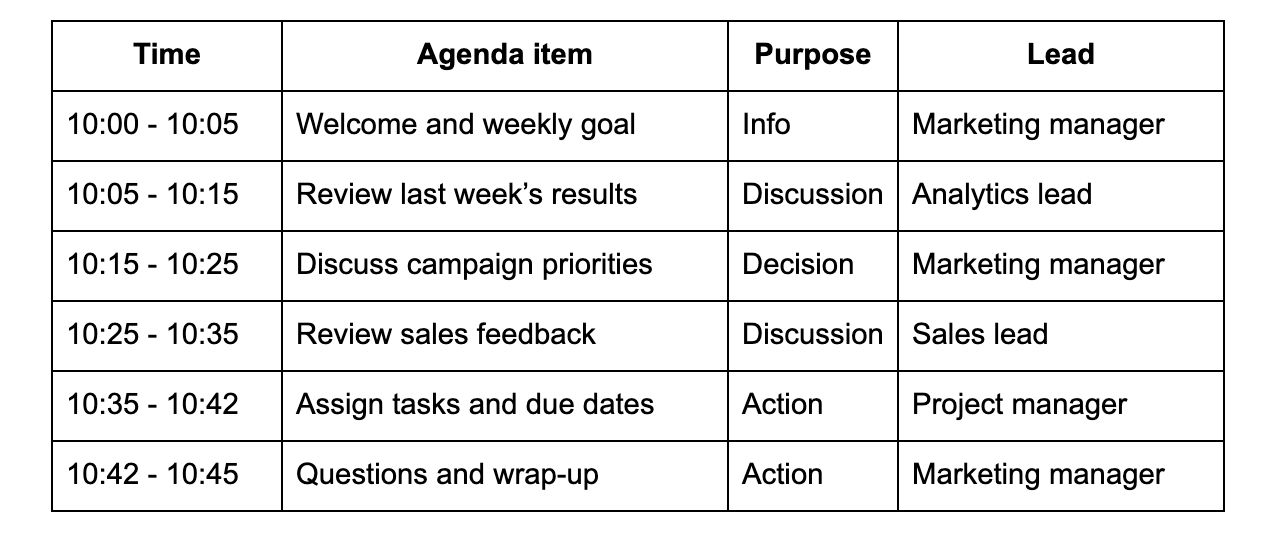
Pre-reading: Review the weekly campaign dashboard before the meeting.
This is considered a good meeting agenda because it has a clear goal, time limits, and owners. To make it even better you can add space for action items.
Once You Have Your Meeting Agenda
Once you finish your meeting agenda, send it to attendees early. Aim for at least 24 to 48 hours before the meeting when possible.
Put the agenda in the calendar invite and make sure everyone can open the links and access any pre-reading materials.
During the meeting, follow the agenda, but do not treat it as something you can never change. If a more urgent issue comes up, the group can agree to adjust the plan.
After the meeting, share notes, decisions, tasks, owners, and deadlines. This is what makes having the agenda valuable.
Take Meeting Notes With Summary AI
A meeting agenda helps your team know what to discuss. Meeting notes help everyone remember what happened after the call ends and fill in people who could not attend. Having meeting notes also makes it easier to follow up on action items.
With an AI Note Taker like Summary AI, you can turn a meeting recording into a transcript, summary, and a list of action items. This can help your team review key points, track decisions, and follow up on tasks without trying to write down every word during the meeting.

