





Summary AI and Otter.ai can both record meetings, create transcripts, summarize conversations, and identify action items. However, they are built around slightly different workflows.
Summary AI focuses on AI notes, transcription, and translation. You can use it for online meetings, calls, interviews, lectures, and in-person conversations. It also supports more than 120 languages, live translation, mobile recording, and recordings of any duration.
Otter puts more emphasis on collaborating on transcripts, which means you and your colleagues can take the transcript and highlight text, leave comments, assign action items, capture slides, and work with other people inside that same meeting transcript.
In short, we found Summary AI more focused on capturing and understanding conversations, while Otter.ai gives teams more tools for working together around meeting notes.
Key Facts
- Summary AI focuses on AI notes, transcription, and translation in more than 120 languages.
- Otter.ai focuses more on collaborative transcripts, shared workspaces, and team workflows.
- Both support Zoom, Google Meet, and Microsoft Teams and provide live transcription and AI summaries.
- Summary AI costs $8.99/week or $79.99 per year, while Otter.ai has a free plan and paid plans starting at $8.33 per user per month when billed annually.
Summary AI vs Otter at a glance
| Feature | Summary AI | Otter.ai |
|---|---|---|
| Best for | AI notes, transcription, translation, flexible recording | Collaborative transcripts, shared notes, teams |
| Starting paid price | $8.99/week or $79.99/year | Pro from $8.33/user/month billed annually |
| Zoom, Google Meet, Microsoft Teams | Yes | Yes |
| Live transcription | Yes | Yes |
| AI summaries | Yes | Yes |
| Action items | Yes | Yes |
| AI chat | Yes | Yes |
| Search across meetings | Yes | Yes |
| Transcription languages | 120+ | 6 |
| Live translation | Yes | No |
| In-person recording | Yes | Yes |
| Mobile apps | iOS and Android | iOS and Android |
| Recording length | Any duration | 30 min Basic / 90 min Pro / 4 hrs Business |
| Audio and video imports | Yes | Yes |
| PDF and OCR tools | Yes | No |
| Automatic slide capture | No | Yes |
| Collaborative transcripts | Limited | Yes |
| Slack integration | Limited | Yes |
| CRM integrations | Limited | Available on paid plans |
| Conversation intelligence | No | Enterprise |
| Enterprise security | Privacy and data controls | SOC 2 Type II, GDPR, CCPA, HIPAA options |
As you can see, the biggest difference is what you do with the meeting afterward. Summary AI focuses more on transcription and translation, while Otter.ai gives teams more ways to edit, share, and collaborate inside the transcript.
What is Summary AI?
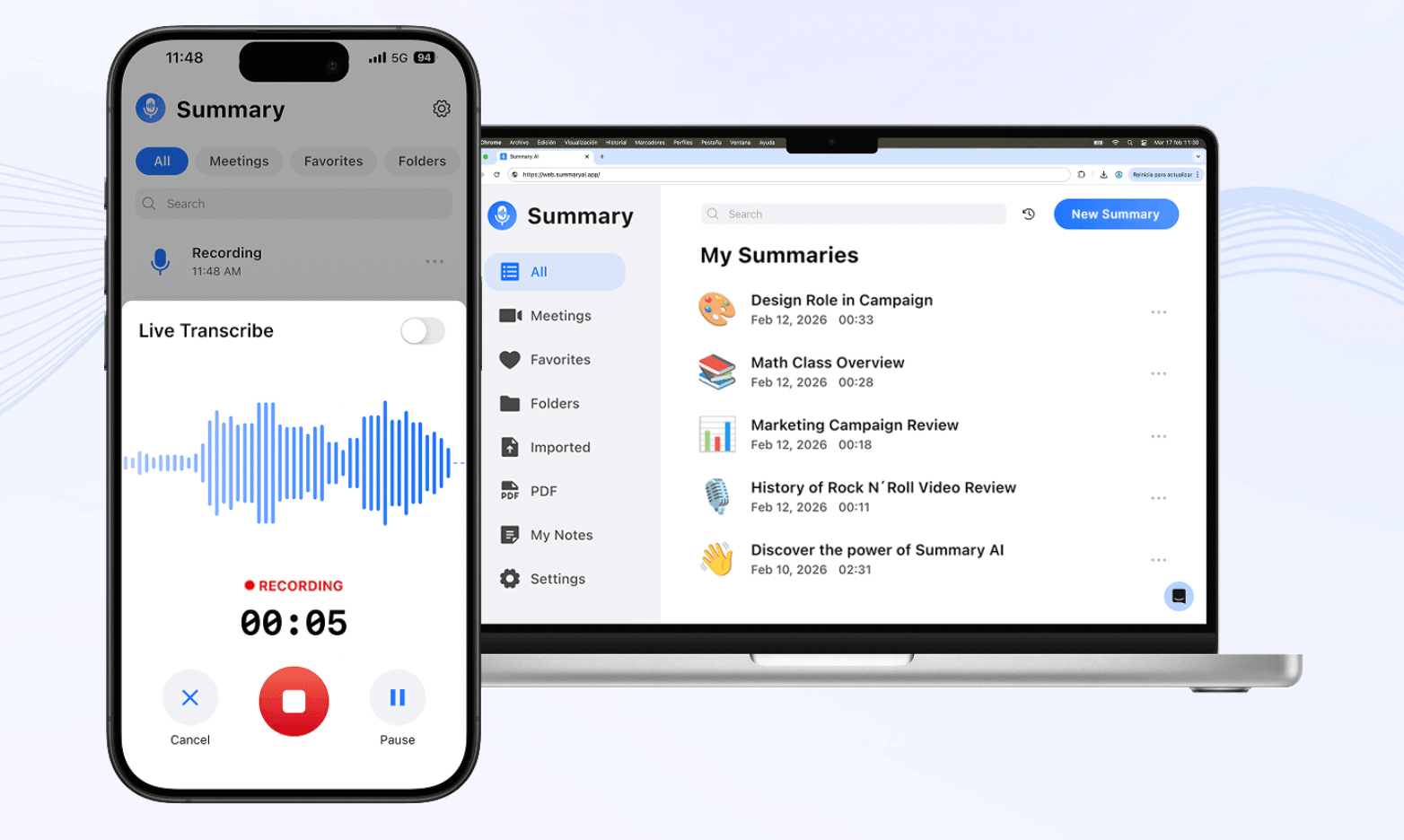
Summary AI is an AI note-taker for turning conversations into AI meeting notes, searchable transcripts, and translations.
You can use it with Zoom, Google Meet, and Microsoft Teams or record directly from your phone or browser. This means the same tool can work for online meetings, interviews, lectures, calls, and even face-to-face conversations.
Afterward, Summary AI creates an AI transcript with speaker labels and timestamps. It can also identify decisions, action items, follow-ups, and other important key points.
For conversations where there are multiple spoken languages, Summary AI supports more than 120 languages and can translate meetings live while people are speaking or after the recording has finished.
You also get AI Chat for searching one or several conversations, along with recordings of any duration, audio and video uploads, and PDF text extraction with OCR.
Our guide to what AI transcription is explains how spoken conversations are turned into searchable text.
What is Otter?
Otter.ai is an AI meeting assistant focused on live transcription and collaborative meeting notes.
Its Notetaker can join Zoom, Google Meet, and Microsoft Teams after you connect your calendar. It records the meeting and creates a transcript while people are speaking.
The transcript works more like a shared workspace. You can highlight sections, leave comments, correct speaker names, and assign action items to other people.
Otter also creates summaries and outlines, while Otter AI Chat lets you ask questions about one meeting or search across previous conversations.
Paid plans add longer meetings, more transcription minutes, integrations, shared workspaces, and administrative tools. Enterprise also adds conversation intelligence for analyzing larger groups of meetings.

Summary AI vs Otter: Main differences
Both platforms can record meetings, create transcripts, and produce AI notes. However, we found the biggest differences in language support, collaboration, recording limits, and integrations.
AI notes, transcription, and search
Both tools create transcripts, summaries, action items, and searchable meeting information. Summary AI uses AI Chat to search one or several recordings, while Otter AI Chat can search individual conversations or your wider meeting history. The main difference is collaboration. Otter lets several people work directly inside the transcript, while Summary AI stays more focused on the conversation and the information inside it.
Translation and language support
Summary AI supports transcription and translation in more than 120 languages, including live translation. Otter.ai supports native transcription in English, Spanish, French, German, Japanese, and Simplified Chinese. Otter Chat can translate transcript text afterward, but it does not provide the same live translation workflow. So, we think Summary AI is the clearer fit if you regularly work across languages.
Recording length and in-person meetings
Both platforms work online and through mobile devices, but their recording limits are different. Summary AI supports recordings of any duration. Otter Basic limits conversations to 30 minutes, Pro increases this to 90 minutes, and Business supports up to four hours. If you often record long interviews, lectures, or meetings, Summary AI gives you a simpler setup.
Collaborative transcripts and slide capture
Otter.ai gives teams more tools inside the transcript. You can highlight text, leave comments, correct speaker information, assign action items, and capture slides or screen shares during supported meetings. Summary AI creates notes and searchable transcripts but does not provide the same collaborative editing or slide capture. We think Otter is more suitable if several people need to work together on the same meeting notes.
File uploads and other content
Both tools can process audio and video files recorded elsewhere. Summary AI also supports PDFs and OCR, which lets you extract searchable text from digital and scanned documents. Otter accepts common audio and video formats, with file-import limits depending on your plan. So, Summary AI gives you more options for document content, while Otter stays more focused on recordings and meetings.
Integrations and team workflows
Otter.ai provides more integrations for team workflows. Depending on your plan, it can work with Slack, Zapier, Dropbox, Zoom cloud recordings, Salesforce, and HubSpot. Summary AI mainly connects with meeting and calendar services such as Zoom, Google Meet, Microsoft Teams, Google Calendar, and Outlook Calendar. If your meeting information needs to move into other business tools, we found Otter more flexible.
Team analytics, privacy, and ease of use
Otter Business adds workspace controls and usage information, while Enterprise includes conversation intelligence for analyzing meeting trends, engagement, and other information across calls. Summary AI can search across recordings through AI Chat but does not have the same organization-wide analytics. Otter also documents SOC 2 Type II, GDPR, and CCPA compliance, while Summary AI explains its privacy practices and user rights in its policy. With either tool, you should still check recording-consent rules before capturing sensitive conversations.
Summary AI vs Otter pricing
Summary AI has weekly and yearly subscriptions, while Otter.ai has a free plan followed by paid plans priced per user.
| Plan | Price |
|---|---|
| Summary AI Weekly | $8.99/week |
| Summary AI Yearly | $79.99/year |
| Otter Basic | $0 |
| Otter Pro | $16.99/user/month or $8.33/user/month billed annually |
| Otter Business | $30/user/month or $19.99/user/month billed annually |
| Otter Enterprise | Custom pricing |
The main difference is the pricing structure. Summary AI keeps its transcription, translation, and long recordings under one subscription, while Otter gives you a free starting point and several plans based on meeting limits and team features.

Who would pick Summary AI vs Otter?
You do not necessarily need the platform with more features. Instead, you should focus on the one that matches what you need from meetings.
| If you… | Consider |
|---|---|
| Regularly work in different languages | Summary AI |
| Need live translation | Summary AI |
| Record long meetings, lectures, or interviews | Summary AI |
| Want PDF and OCR tools | Summary AI |
| Want collaborative live transcripts | Otter.ai |
| Need automatic slide capture | Otter.ai |
| Want comments and highlights inside transcripts | Otter.ai |
| Need Slack, Zapier, or CRM integrations | Otter.ai |
| Want organization-wide conversation analytics | Otter.ai Enterprise |
Otter.ai is more suitable if the transcript itself needs to become a shared workspace where you can collaborate. Comments, highlights, action items, slide capture, and integrations give teams more ways to work together after a meeting. Students can use either platform as well.
You can compare more options in our guide to the best AI meeting assistants.
Summary AI vs Otter: Which should you choose?
After comparing the two platforms, we think the main difference comes down to whether you value translation and flexible recording or collaboration inside the transcript.
As an AI note-taker, Summary AI makes more sense if you want AI notes, searchable transcripts, and translation in one workflow. You also get more than 120 languages, live translation, mobile recording, recordings of any duration, and PDF tools.
Otter.ai makes more sense if several people need to work with the same meeting notes. Its collaborative transcripts, comments, highlights, action items, slide capture, and integrations give teams more ways to use meeting information together.
As we see it, Summary AI focuses more on capturing, transcribing, and translating live meetings. Otter.ai focuses more on live collaborative transcripts and shared meeting workflows with more integrations.

