As this Summary AI vs tl;dv guide will show you, these two platforms are AI meeting assistants that can record conversations, create transcripts, summarize meetings, and help you find important information afterward. However, they are a bit different and serve different kinds of people.
Summary AI mainly focuses on AI note taking, transcription, and translation. It turns meetings and calls into organized notes, creates searchable transcripts, and supports more than 120 languages.
tl;dv also offers meeting notes and transcription, but it focuses more on recorded business meetings. It includes video recording, clips and reels, CRM integrations, call analysis, and sales coaching tools.
In this comparison, we will walk you through the main differences between Summary AI vs tl;dv, so that you can choose the right one for your needs.
Key Facts
Summary AI focuses on AI note taking, transcription, and translation in more than 120 languages.
tl;dv focuses more on meeting video, CRM integrations, multi-meeting analysis, and sales tools.
Both work with Zoom, Google Meet, and Microsoft Teams and create AI notes and searchable transcripts.
Summary AI costs $8.99/week or $79.99 per year, while tl;dv has a free plan and paid plans starting at $18 per seat per month when billed annually.
Summary AI vs tl;dv at a glance
| Feature | Summary AI | tl;dv |
|---|---|---|
| Best for | AI note taking, transcription, translation | Business meetings, video, CRM and sales workflows |
| Starting paid price | $8.99/week or $79.99/year | Pro from $18/seat/month billed annually |
| Zoom, Google Meet, Microsoft Teams | Yes | Yes |
| AI meeting notes | Yes | Yes |
| AI transcription | Yes | Yes |
| Speaker identification | Yes | Yes |
| Languages | 120+ | 30+ |
| Live translation | Yes | No equivalent feature |
| AI chat and meeting search | Yes | Yes |
| In-person recording | Yes | Yes |
| Recording duration | No limit | Up to 3 hours |
| Meeting video recording | No | Yes |
| Clips and reels | No | Yes |
| Audio and video uploads | Yes | Yes |
| PDF and OCR tools | Yes | No |
| CRM integrations | Limited | Yes |
| Multi-meeting analysis | Yes, through AI Chat | Yes, with dedicated reports |
| Sales coaching tools | No | Yes |
| Mobile apps | iOS and Android | iOS and Android |
As you can see, the main difference is what you can do with the transcript. With Summary AI, you get a workflow centered on notes, transcription, and translation. With tl;dv, you get more tools for video, CRM workflows, sales analysis, and team features.
What is Summary AI?
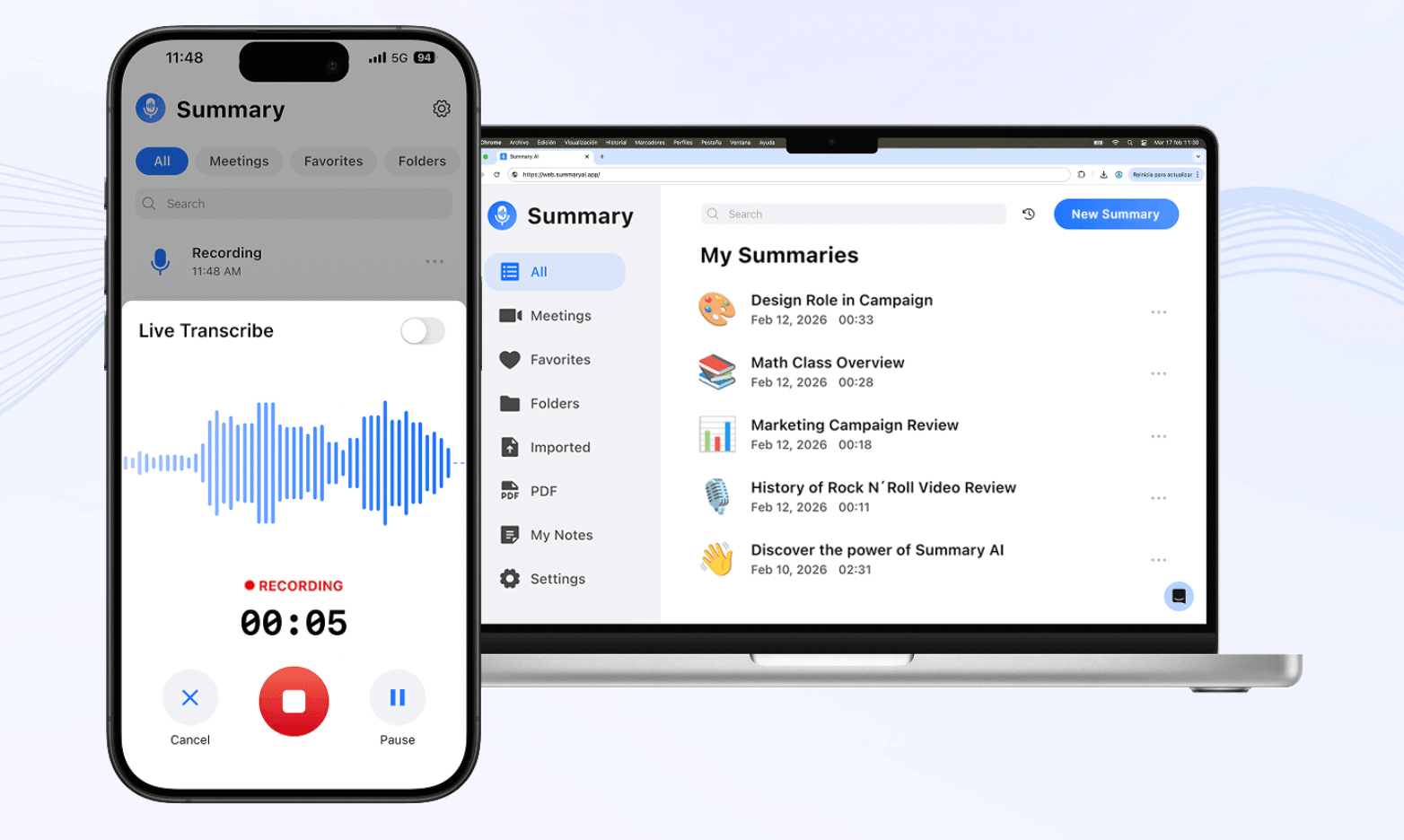
Summary AI is an AI note-taker focused on summaries, transcription, and translation.
Its AI meeting assistant turns meetings, calls, interviews, lectures, and other conversations into organized notes. It can highlight key points, decisions, follow-ups, and action items, so you do not have to take notes by hand.
The AI Transcription turns audio and video into searchable text. It works with Zoom, Google Meet, and Microsoft Teams, and you can also record from your phone or browser or upload existing files.
Summary AI also supports AI Translation in more than 120 languages. You can translate meetings live or after they have been recorded.
With AI Chat, you can search your transcripts by asking questions, such as what was decided or which tasks were assigned.
It also supports long recordings, file uploads, mobile recording, and PDF text extraction with OCR.
Overall, Summary AI focuses on turning conversations into clear, searchable information rather than building a larger sales or CRM workflow around them.
Our guide to what an AI note taker is explains how this type of software works.
What is tl;dv?

Another AI meeting assistant built mainly around online business meetings is tl;dv.
It works with Zoom, Google Meet, and Microsoft Teams and records both meeting audio and video. After the meeting, it creates a transcript and AI notes that you can search and review later.
You can also create a clip from a specific part of a meeting or combine several moments into a reel. This way, you can share part of a customer call, interview, or internal discussion without sending the full recording.
In addition, tl;dv includes CRM integrations, reports across multiple meetings, sales playbooks, objection analysis, and sales coaching tools on its paid plans.
We think this makes tl;dv more relevant when recorded meetings need to become part of a larger sales, customer-success, or CRM workflow.
Summary AI vs tl;dv: Main differences
Both Summary AI and tl;dv can create meeting notes, transcripts, summaries, and searchable records. The main differences are in language support, video, integrations, and sales tools.
AI note taking, transcription, and search
Both tools can create notes, transcripts, summaries, and identify speakers.

Summary AI uses AI Chat to help you find decisions, action items, and other details across recordings. tl;dv offers similar search tools but adds more features for analyzing large groups of business meetings.
Overall, Summary AI focuses more on everyday note taking and transcription, while tl;dv adds more team analysis tools.
AI translation and language support
Summary AI supports transcription and translation in more than 120 languages, including live translation. tl;dv supports more than 30 languages for transcripts, notes, and reports.
This gives Summary AI more flexibility for international clients and multilingual teams.
Recording and video
Both tools work with Zoom, Google Meet, Microsoft Teams, and in-person conversations.
Summary AI supports recordings of any length and can create notes, transcripts, translations, and AI Chat answers from them. tl;dv focuses more on video and lets you create clips and reels from meetings.
In simple terms, Summary AI focuses more on the information inside conversations, while tl;dv offers more video-sharing features.
CRM, sales, and team tools
tl;dv offers more CRM and sales features. It connects with tools like Salesforce, HubSpot, and Zoho and supports thousands of other integrations. Higher plans also include sales coaching, call analysis, and multi-meeting reports.
Summary AI connects with major meeting and calendar tools but does not offer the same level of sales and CRM features.
Other content and privacy
Summary AI can also work with uploaded audio, video, interviews, lectures, PDFs, and scanned documents using OCR.
tl;dv supports file uploads too, but stays more focused on business meetings and team workflows.
Both platforms have privacy and data protection features, but you should still follow local recording laws and your company’s data policies when recording conversations.
Summary AI vs tl;dv pricing
Summary AI and tl;dv use different pricing models. Summary AI has weekly and yearly subscriptions, while tl;dv has a free plan followed by paid plans priced per seat.
| Plan | Price |
|---|---|
| Summary AI Weekly | $8.99/week |
| Summary AI Yearly | $79.99/year |
| tl;dv Free | $0 |
| tl;dv Pro | $29/seat/month or $18/seat/month billed annually |
| tl;dv Business | $39/seat/month or $29/seat/month billed annually |
| tl;dv Enterprise | Custom pricing |
As you can see, Summary AI uses a simpler subscription model, while tl;dv can become more expensive as you add paid users because its plans are priced per seat.

Which users should try Summary AI and tl;dv
You do not necessarily need the AI meeting assistant with the longest list of features. You need the one that matches the types of conversations you have and what you want to do with them afterward.
| If you… | Consider |
|---|---|
| Want AI notes for meetings and calls | Summary AI |
| Regularly work across different languages | Summary AI |
| Need live AI translation | Summary AI |
| Have recordings longer than three hours | Summary AI |
| Want meeting video, clips, and reels | tl;dv |
| Need deep CRM integrations | tl;dv |
| Want multi-meeting sales reports | tl;dv |
| Need sales coaching and playbooks | tl;dv |
| Want a free meeting-recording plan | tl;dv |
Summary AI is a better fit if you want conversations turned into notes and searchable transcripts. It is also useful if you work in different languages or record conversations outside Zoom, Google Meet, and Microsoft Teams.
For example, you can use the mobile app for interviews, lectures, client meetings, and other in-person conversations. Afterward, you can create notes, transcripts, translations, and search the recording with AI Chat.
tl;dv is more focused on teams that record many online meetings. It offers video recording, clips, CRM integrations, meeting reports, and sales coaching tools.
In simple terms, Summary AI may be better for freelancers, students, researchers, consultants, and professionals who mainly need notes, transcription, and translation. tl;dv may be better for sales and customer-success teams that work with many recorded customer meetings.
You can compare more options in our guide to the best AI meeting assistants.
Summary AI vs tl;dv: Which should you choose?
After comparing the two platforms, we think the decision mainly comes down to what you want your AI meeting assistant to do after the conversation ends.
Choosing Summary AI
Summary AI makes more sense if your priorities are AI note taking, transcription, and translation. Its AI Note Taker creates organized notes and action items, AI Transcription turns spoken audio and video into searchable text, and AI Translation supports more than 120 languages.
Furthermore, you can use live translation, AI Chat, mobile recording, recordings of any duration, audio and video uploads, and PDF extraction. So, you have several ways to capture information without moving into a complex sales or CRM system.
Choosing tl;dv
tl;dv makes more sense if your workflow is centered on recorded business meetings. It provides meeting video, clips and reels, CRM integrations, multi-meeting reports, sales playbooks, objection analysis, and coaching tools.
As we see it, the distinction is fairly simple. Summary AI focuses more on capturing, transcribing, and translating conversations, while tl;dv puts more emphasis on video, CRM connections, and sales workflows.
So, if your main goal is to avoid manual note taking and make conversations easier to search and understand, take a look at Summary AI. If you want to connect recorded meetings with a wider sales and team workflow, tl;dv gives you more options.