





Summary AI and OLVA can both transcribe meetings, create notes, and help you find information afterward. However, they are designed to help at different points in the meeting.
Summary AI focuses on recording, transcription, notes, and translation. You can use it for online meetings, interviews, lectures, calls, and in-person conversations. It also supports more than 120 languages.
OLVA puts more attention on “live meeting assistance” which means it can detect questions, suggest possible answers, provide coaching, and use documents as context during the conversation.
In short, we found Summary AI to be useful for documenting and saving what was discussed and providing material for the follow-up, while OLVA gives you more help during the meeting itself.
Key Facts
- Summary AI focuses on notes, transcription, translation, and flexible recording.
- OLVA focuses more on live answers, question detection, and AI coaching.
- Both support live transcription, summaries, action items, and live translation.
- Summary AI costs $8.99 per week or $79.99 per year, while OLVA Plus starts at $12.50 per month when billed annually.
Summary AI vs OLVA at a glance
| Feature | Summary AI | OLVA |
|---|---|---|
| Best for | AI notes, transcription, translation, flexible recording | Live answers, coaching, question detection |
| Starting paid price | $8.99/week or $79.99/year | Plus from $12.50/month billed annually |
| Basic allowance | No ongoing $0 plan listed | $0 Basic shown with 2 meeting hours/month |
| Zoom, Google Meet, Microsoft Teams | Yes | Yes |
| Slack Huddles | Limited | Yes |
| Webex | Limited | Yes |
| Live transcription | Yes | Yes |
| AI summaries and action items | Yes | Yes |
| AI chat | Yes | Live and post-meeting Q&A |
| Automatic question detection | No | Yes |
| Live AI coaching | No | Yes |
| Languages | 120+ | 87 language and regional options |
| Live translation | Yes | Yes |
| Meeting bot | Meeting Assistant can join | No |
| Bot-free capture | No | Yes |
| Meeting audio stored | Yes | No |
| In-person meetings | Yes | Yes |
| Mobile apps | iOS and Android | iOS and Android |
| Recording length | Any duration | Unlimited on Pro |
| Document-aware AI | PDF and file tools | Plus and Pro |
| PDF and OCR | Yes | No |
| Searchable meeting history | Yes | Yes |
| PowerPoint generation | No | Yes, using separate credits |
| Slack, Google Drive, Notion | Limited | Pro |
| Webhooks | Limited | Pro |
As you can see, the main difference is timing. Summary AI helps you capture and work with the conversation, while OLVA adds more support while the meeting is still happening.
What is Summary AI?
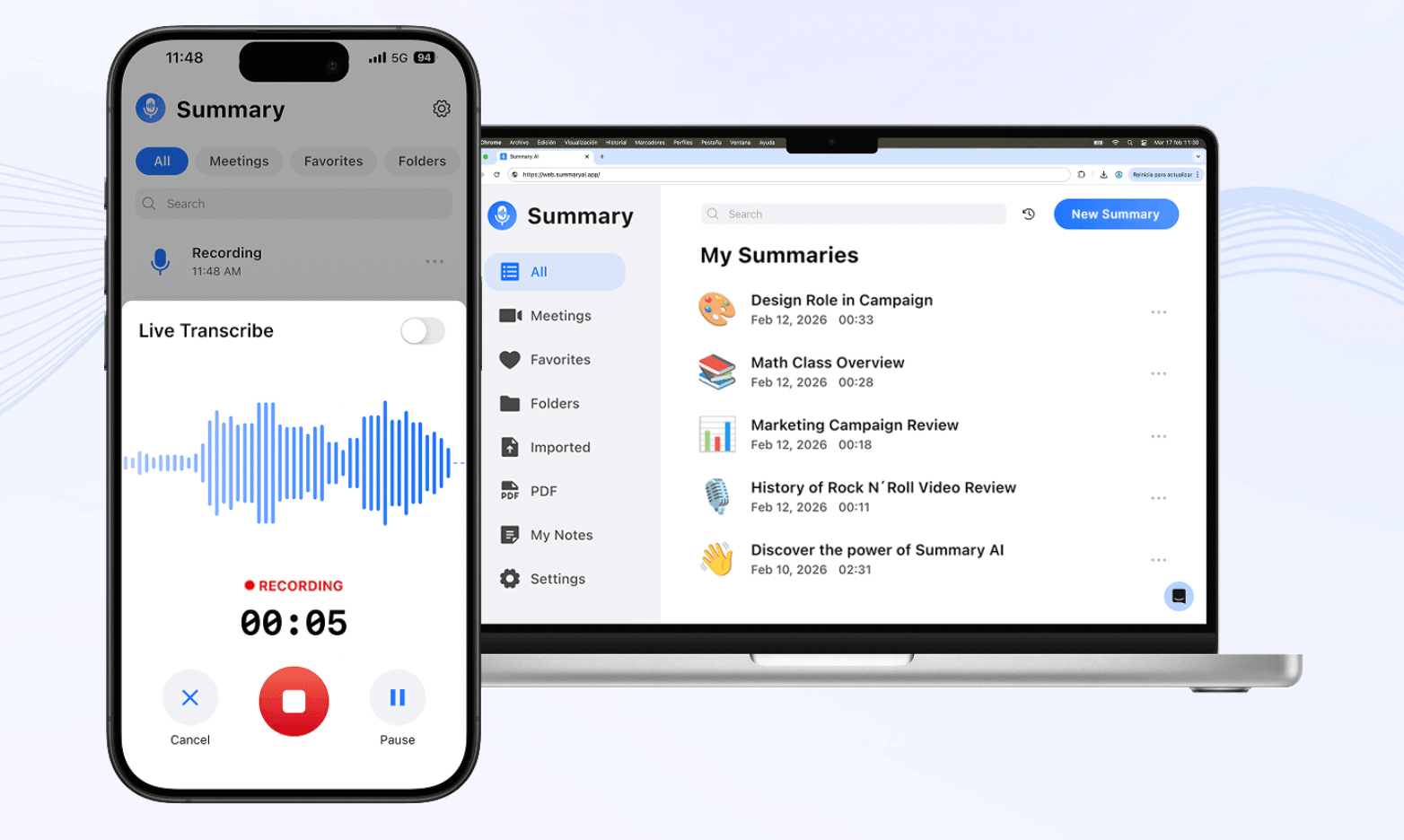
Summary AI is an AI meeting assistant for turning conversations into notes, searchable transcripts, and translations. You can use it with Zoom, Google Meet, and Microsoft Teams or record manually from your phone or browser.
Afterward, it creates a transcript with speaker identification and timestamps and pulls out decisions, action items, and follow-ups. It also supports live translation in more than 120 languages and AI Chat for searching one or several conversations.
You can also upload audio and video, record conversations of any duration, and extract text from PDFs and scanned documents with OCR.
Our guide to what an AI note taker is explains how this type of software works.
What is OLVA?
OLVA is a bot-free AI meeting assistant built to help you during live conversations as well as afterward. It works with Zoom, Google Meet, Microsoft Teams, Slack Huddles, Webex, and in-person meetings.

During a call, OLVA creates a live transcript, detects questions, and can suggest possible answers based on the conversation and any extra context you provide. Its AI Coach can also suggest wording or follow-up questions.
After the meeting, you can search the transcript, summaries, action items, decisions, and other meeting information. We found OLVA more focused on helping you respond while the conversation is still happening.
Summary AI vs OLVA: Main differences
Both tools create transcripts, summaries, and meeting notes. However, we found the biggest differences in live assistance during the call, recording, translation, and document use.
Summary AI vs OLVA: Main differences
AI notes, transcription, and search
Both tools create searchable transcripts, summaries, decisions, and action items. Summary AI uses AI Chat to search one or several conversations. OLVA also keeps a searchable meeting history and lets you ask questions after the meeting.
The main difference is that OLVA gives you more help before the meeting ends. Summary AI focuses more on the recorded conversation and what you can do with it afterward.
Live questions, answers, and coaching
OLVA can detect questions during a meeting and suggest possible answers while you are still talking. Its AI Coach can also suggest wording and follow-up questions based on the conversation. Summary AI’s AI Chat is more focused on asking questions about recordings and transcripts. So, we think OLVA has the advantage if you want help during sales calls, interviews, or client meetings.
Translation and language support
Summary AI supports transcription and translation in more than 120 languages, including live translation. OLVA supports 87 language and regional options and also has live translation.
Both tools can help with meetings in different languages. Summary AI supports more languages overall, while OLVA combines translation with live coaching and question detection.
Bot-free vs meeting assistant capture
Summary AI can send its Meeting Assistant into supported online meetings. OLVA records through your computer or phone, so another participant does not appear in the call. If you want a tool that can automatically join meetings, Summary AI may be more convenient. If you prefer meetings without a bot, OLVA gives you that option.
Recording and audio storage
Summary AI keeps the recording as part of its normal workflow. This means you can go back and listen to the original conversation later. OLVA uses the audio to create a transcript but does not keep the meeting audio or video afterward.
OLVA may make more sense if you only want the transcript and do not want an audio archive.
Documents and meeting context
Summary AI can work with PDFs and scanned documents using OCR. It can also process uploaded audio and video files. OLVA uses documents in a different way. Plus and Pro users can add documents as context for live questions and answers.
This means OLVA can use a contract, brief, or presentation to help answer questions during a meeting. Summary AI is more flexible for processing and transcribing files.

Summary AI vs OLVA pricing
Summary AI has weekly and yearly subscriptions. OLVA prices its plans mainly around meeting time and access to its live features.
| Plan | Price |
|---|---|
| Summary AI Weekly | $8.99/week |
| Summary AI Yearly | $79.99/year |
| OLVA Basic | $0 shown, with 2 meeting hours/month |
| OLVA Plus | $150/year, or $12.50/month billed annually |
| OLVA Pro | $239.88/year, or $19.99/month billed annually |
| OLVA Teams | Custom |
| OLVA Enterprise+ | Custom |
Summary AI gives you a straightforward subscription around recordings, transcription, and translation. OLVA’s higher plans increase meeting time and add more live and connected workflows.
Which users choose Summary AI vs OLVA?
You need the tool that matches your use cases, not the one with more features. Here are a few things to keep in mind:
| If you… | Consider |
|---|---|
| Need AI notes and searchable transcripts | Summary AI |
| Work across many different languages | Summary AI |
| Want stored recordings | Summary AI |
| Record long meetings, interviews, or lectures | Summary AI |
| Work with PDFs, audio, and video files | Summary AI |
| Want automatic question detection | OLVA |
| Need suggested answers during meetings | OLVA |
| Want live AI coaching | OLVA |
| Prefer bot-free meeting capture | OLVA |
| Want documents used as live meeting context | OLVA |
| Need meeting-to-PowerPoint generation | OLVA |
From our comparison, Summary AI makes more sense if you mainly want to capture and work with conversations. You can use it for a Zoom call, long interview, lecture, or multilingual meeting and keep the same general workflow.
OLVA fits users who want more help during the conversation itself. Question detection, suggested answers, coaching, and document-aware Q&A can be useful for salespeople, consultants, recruiters, advisors, and other professionals who need to respond quickly.
You can compare more options in our guide to the best AI meeting assistants.
Summary AI vs OLVA: Which should you choose?

Summary AI is an AI note-taker that makes more sense if you want the perfect notes, searchable transcripts, and live translation for meetings. It supports more than 120 languages, recordings of any length, file uploads, and tools for working with text.
OLVA makes more sense if you want live help during meetings. Its automatic question detection, suggested answers, live coaching, document-aware Q&A, and bot-free recording can help when you need to think and respond quickly.
In simple terms, Summary AI focuses more on recording, transcription, translation, and work after the meeting. OLVA focuses more on live answers, coaching, and help during the conversation.

